TL;DR:
- Effective office setup workflows require early planning, clear role assignments, and staged IT and ergonomic preparations. Sequencing furniture, IT, and compliance tasks carefully prevents delays and unnecessary costs during relocation. Post-move verification and live snag lists ensure operational stability and legal compliance from day one.
An effective workflow for new office setup is defined as a structured sequence of planning, compliance, IT staging, and verification tasks that carries a business from lease decision to fully operational workspace without disruption. Most UK office moves fail not because of budget overruns but because of sequencing errors: IT ordered too late, ergonomic assessments skipped, or furniture arriving before network cabling is complete. The Health and Safety Executive’s Display Screen Equipment (DSE) regulations, the HSE CK1 assessment template, and tools like Microsoft Planner or Asana all play defined roles in a well-run relocation. Getting the order right matters as much as getting the tasks done.
The single most important rule in any new office planning guide is this: start earlier than you think you need to. Planning should begin 12 to 18 months before your lease expiry. That window gives you time to assess fit-out options, negotiate lease terms, and avoid compressing every other decision into a frantic final quarter.
The first task is legal sequencing. Lock down lease timing first before committing to any fit-out or furniture spend. A lease delay of even four weeks can cascade into IT installation conflicts, furniture delivery clashes, and staff communication failures. Every other planning milestone depends on a confirmed handover date.
Once the lease is confirmed, appoint two named roles immediately:
Appointing a dedicated move manager six to twelve months before the move significantly improves coordination and reduces timeline slippage. Without a named owner, tasks drift between departments and deadlines become suggestions.
Your office setup checklist at this stage should cover six areas: lease and legal obligations, budget allocation, staff communication plan, IT requirements, health and safety obligations, and furniture and fit-out scope. Each area needs an owner, a deadline, and a review date.
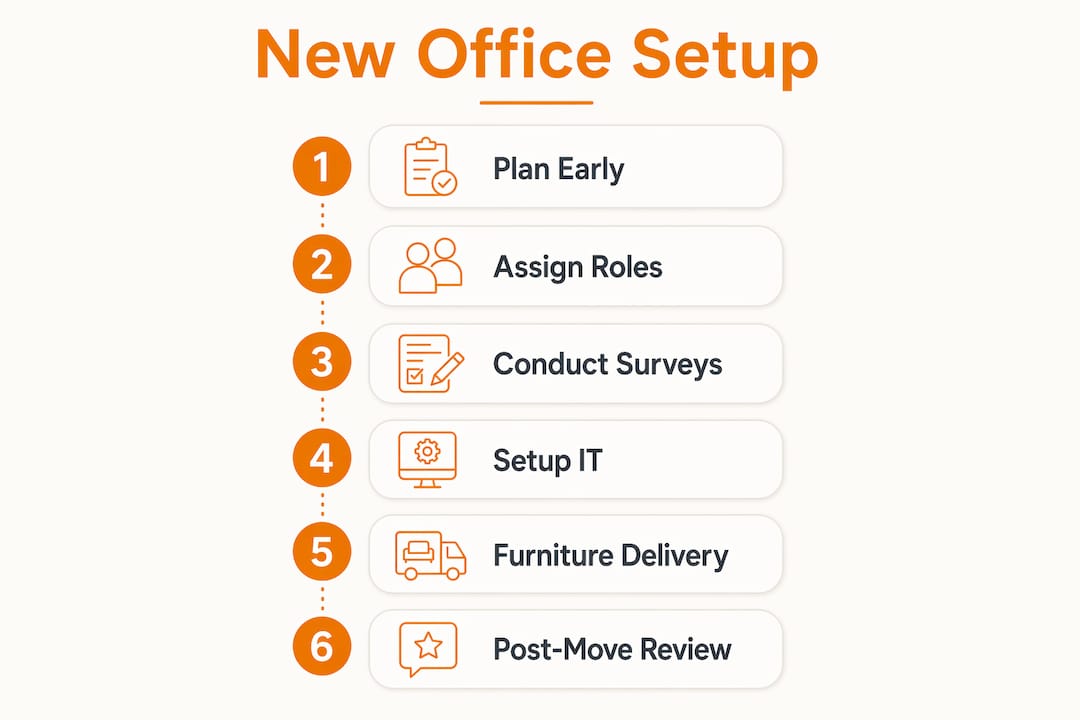

Employee engagement belongs in this phase, not as an afterthought. Surveying staff on location preferences, commute concerns, and workspace needs before finalising the layout saves costly redesigns later. Teams that feel consulted adapt faster and report fewer productivity complaints in the first month.
Pro Tip: Create a shared project tracker in Microsoft Planner or Asana from day one. Assign every checklist item to a named person with a due date. A task without an owner is a task that will not get done.
IT is the most technically complex part of any office relocation workflow, and it is the area most frequently underestimated. The critical mistake is treating IT as a move-day task rather than a pre-move project with its own staged timeline.
Follow this sequence:
Experienced IT managers use a pre-staging, desk-move, and verification loop rather than a single cutover. The loop approach means problems surface in controlled conditions rather than during a live working day.
Pro Tip: Assign a dedicated IT move manager who is on-site from pre-staging through to the end of the first full working week. Remote support alone is not sufficient when physical cabling faults or hardware misconfigurations need hands-on resolution.
DSE compliance is a legal obligation, not a best-practice recommendation. Under UK law, DSE risk assessments are mandatory for any worker who uses a screen for approximately one hour or more per day. The assessment scope covers the chair, desk, screen position, input devices, lighting, temperature, and software interface. A new office setup triggers a fresh assessment for every workstation.
The practical sequence for ergonomic workstation setup runs as follows:
DSE assessments must be individualised. A one-size-fits-all workstation configuration does not satisfy the legal requirement and does not protect your staff from musculoskeletal injury.
Acting on assessment findings is where many businesses fall short. Employers must implement adjustments such as monitor risers, lumbar supports, or footrests once a risk is identified. Completing the paperwork without purchasing the equipment is not compliance. The HSE CK1 template provides a structured format for recording findings and tracking remedial actions.
Assessments are not a one-off task. Triggers for review include new starters, equipment changes, a change in role, or a reported health complaint. Regular follow-up on ergonomic setups prevents users from reverting to harmful postures over time, a phenomenon practitioners call “setup drift.”
Furniture procurement sits at the intersection of budget, compliance, and operational readiness. Get it wrong and you either overspend on pieces that do not fit the space, or you delay IT installation because desks arrive before cabling is complete.
Start with a furniture audit of your current office. Identify what can be repurposed, what needs replacing, and what the new space requires that you do not currently own. This audit directly informs your fit-out budget. Global office fit-out costs average around $2,150 per square metre, with annual increases of two to six per cent driven by energy and labour costs. That figure underscores why a detailed budget built on actual measurements and a confirmed furniture list outperforms rough estimates.
Space planning decisions should reflect how your team actually works, not how you assume they work. The three most common layout types and their trade-offs are:
| Layout type | Best suited for | Key limitation |
|---|---|---|
| Open plan | Collaboration-heavy teams | Noise and concentration issues |
| Zoned hybrid | Mixed individual and team work | Requires careful acoustic planning |
| Cellular offices | Deep focus or confidential work | Reduces spontaneous collaboration |
For most UK businesses moving in 2026, a zoned hybrid layout serves hybrid working patterns best. Dedicate a portion of the floor to space-efficient desk arrangements for focused work, and allocate a separate zone for collaborative tables and meeting room furniture.
Coordinate furniture delivery with your IT installation timeline. Desks should arrive after cabling is complete but before IT pre-staging begins. Delivering furniture too early blocks access to floor boxes and wall ports. Delivering it too late pushes back the pre-staging phase and compresses your testing window.
Pro Tip: When sourcing ergonomic chairs and height-adjustable desks in bulk, request lead time confirmation in writing before placing the order. UK suppliers frequently quote four to six week lead times on commercial quantities. Factor this into your master timeline, not as an afterthought.
For detailed guidance on selecting durable commercial pieces, the office furniture buying guide from Furnitureforbusiness covers specification criteria for teams of all sizes.
A successful move day is not the end of the workflow. The post-move verification phase determines whether the office actually functions as planned or simply looks like it does.
Run through this verification sequence in the first five working days:
The office fit-out workflow guide from Furnitureforbusiness provides a detailed post-move checklist specifically calibrated for UK teams, including compliance sign-off templates.
A successful workflow for new office setup requires early legal sequencing, named role ownership, staged IT pre-staging, DSE compliance, and a structured post-move verification process to achieve operational stability from day one.
| Point | Details |
|---|---|
| Start planning 12 to 18 months ahead | Lock down lease timing before committing to any fit-out, IT, or furniture spend. |
| Appoint named owners for every task | A move manager and budget decision-maker reduce timeline slippage and coordination failures. |
| Stage IT installation in four phases | Order equipment at 60 days, install at 30 days, pre-stage at two weeks, verify post-move. |
| DSE compliance requires action, not just paperwork | Identified risks must be resolved with physical equipment changes, not recorded and filed. |
| Post-move snag lists need owners and deadlines | Unassigned issues persist indefinitely. Name an owner and set a deadline for every item. |
Most office moves that run over budget or over schedule share one root cause: the planning phase was treated as a formality rather than a project in its own right. Teams spend weeks debating chair colours and almost no time confirming who owns the IT installation timeline or who signs off the DSE assessments.
The detail that surprises most office managers is how much the furniture delivery sequence matters. I have seen pre-staging phases delayed by two weeks because desks arrived before cabling was complete, blocking access to floor boxes. That two-week delay pushed the move date, which triggered a lease overlap cost that dwarfed the entire furniture budget. Sequencing is not a logistics detail. It is a financial decision.
On ergonomics: the assessment form is not the goal. The adjusted workstation is the goal. Businesses that complete DSE paperwork and then fail to order the monitor riser or lumbar support are exposed to both legal risk and genuine staff injury. The HSE does not accept “we assessed it” as a defence when the remedial action was never taken.
My honest recommendation is to treat the post-move snag list as a live project, not a closing formality. Keep it visible in your shared tracker, review it daily for the first fortnight, and close it formally only when every item has a confirmed resolution. The offices that feel settled after two weeks are the ones where someone was still actively managing that list on day ten.
— Furniture

Furnitureforbusiness supplies commercial office furniture to UK businesses undergoing new fit-outs and relocations, with free delivery to the UK mainland. The range covers everything your setup workflow requires: ergonomic office chairs built to DSE compliance standards, height-adjustable standing desks for hybrid working teams, and meeting room furniture for collaborative zones. Bulk order pricing and confirmed lead times make procurement planning straightforward for teams of 5 to 500. Explore the full range of office desks and seating to match your space plan and timeline.
Planning should begin 12 to 18 months before your lease expiry. This window allows time for lease negotiation, fit-out decisions, IT procurement, and staff communication without compressing critical tasks.
A DSE assessment covers the chair, desk, monitor position, input devices, lighting, temperature, and software interface for every worker using a screen for approximately one hour or more per day. Assessments must be individualised and reviewed when equipment or roles change.
Network equipment should be ordered 60 to 45 days before the office opens. Physical installation runs from 30 to 15 days out, with pre-staging completed one to two weeks before move day.
A snag list is a named-owner register of unresolved issues after the move, each with a resolution deadline. Without named owners and deadlines, outstanding IT faults, missing furniture, and compliance gaps persist indefinitely.
Global fit-out costs average around $2,150 per square metre, with annual increases of two to six per cent. UK businesses should build detailed budgets from confirmed measurements and a fixed furniture specification rather than relying on per-square-metre estimates alone.

Phone: 0330 043 4114
VAT no. GB 991 8681 60
Company no. 07250570