A properly adjusted ergonomic chair makes neutral posture the easiest option while you sit. It will not undo years of postural habits on its own, but it removes the structural barriers that make good posture feel effortful. For UK workplaces, three Furnitureforbusiness models are available now and ready to trial:
The immediate next step is simple: measure your seat height so your feet sit flat on the floor and your hips are level with or slightly above your knees. Everything else in this guide builds from there.
A posture-improving chair works by supporting the pelvis and lumbar curve so that neutral spinal alignment requires less muscular effort, but adjustability and correct setup matter far more than brand prestige.
| Point | Details |
|---|---|
| Adjustability beats brand | Lumbar, seat depth, height, and armrest range determine whether a chair actually fits the user. |
| Setup is a system | Chair adjustments only work when desk, monitor, and keyboard heights are calibrated together. |
| Movement breaks are non-negotiable | Even a correctly set-up ergonomic chair does not offset the risks of unbroken prolonged sitting. |
| Red flags need clinical input | Radiating pain, neurological symptoms, or persistent severe pain require a physiotherapist, not a new chair. |
| Furnitureforbusiness for UK teams | The Onyx, OE Austin, and OE Saturn cover all-day, shared, and executive use cases with free UK mainland delivery and bulk pricing. |
The core mechanism is straightforward. A well-designed ergonomic chair supports the pelvis and lumbar curve so that the spine can maintain its natural S-shape without constant muscular effort. When the chair does that work, your muscles are free to activate at a sustainable level rather than fighting against a seat that tips your pelvis backwards.
WIRED’s testing of over 70 office chairs found that adjustability is the primary factor separating chairs that support posture from those that merely look the part. A fixed lumbar pad positioned for a 5’10" user does almost nothing for someone 5’4". The adjustment range is the product.
What chairs cannot do is equally worth stating clearly. Postural adaptation built up over years involves muscle memory, movement patterns, and often underlying tissue changes. A chair addresses the seated environment; it does not retrain movement or resolve structural issues. CUH’s seating and ergonomics guidance is explicit that neutral spinal posture requires both appropriate support and active engagement from the user.
Active-sitting designs (wobble stools, balance chairs) increase core muscle activation and allow multidirectional movement, which can be useful in short bursts. They are not a substitute for a fully adjustable task chair across an eight-hour shift. The British Heart Foundation notes that prolonged sitting carries cardiometabolic risks regardless of chair quality, which is why movement breaks matter alongside any seating upgrade.
Key things a good chair can do:
What it cannot do without additional input:
The three highest-priority features are adjustable lumbar support, seat height and depth, and multi-axis armrests. Everything else is secondary. Wirecutter’s testing protocol confirms that comfort across varied body types, lumbar support, and adjustability are the core evaluation metrics that separate genuinely useful chairs from those that look ergonomic on a spec sheet.
Here is what to check before buying:
Pro Tip: Check the chair’s weight capacity and seat width against your team’s actual range of body sizes before ordering. A seat depth of 48 cm suits a tall user but can leave a shorter person unable to use the lumbar support correctly. Physiomed’s buying guide recommends measuring thigh length (back of knee to seat bone) as the most reliable way to match seat depth to the individual.
| Feature | Why it matters | What to look for |
|---|---|---|
| Lumbar adjustment | Supports natural spinal curve | Vertical + depth adjustment |
| Seat depth | Prevents slumping or edge pressure | 2–3 finger clearance at knee |
| Seat height | Aligns hips, knees, and feet | Adjustable 42–54 cm range |
| Armrest range | Reduces shoulder and neck strain | 4D adjustment preferred |
| Seat tilt | Opens hip angle, reduces disc load | Forward tilt option |
| Breathability | Reduces heat and fidgeting | Mesh back or ventilated foam |
| Warranty | Protects team investment | Minimum two years, UK returns |
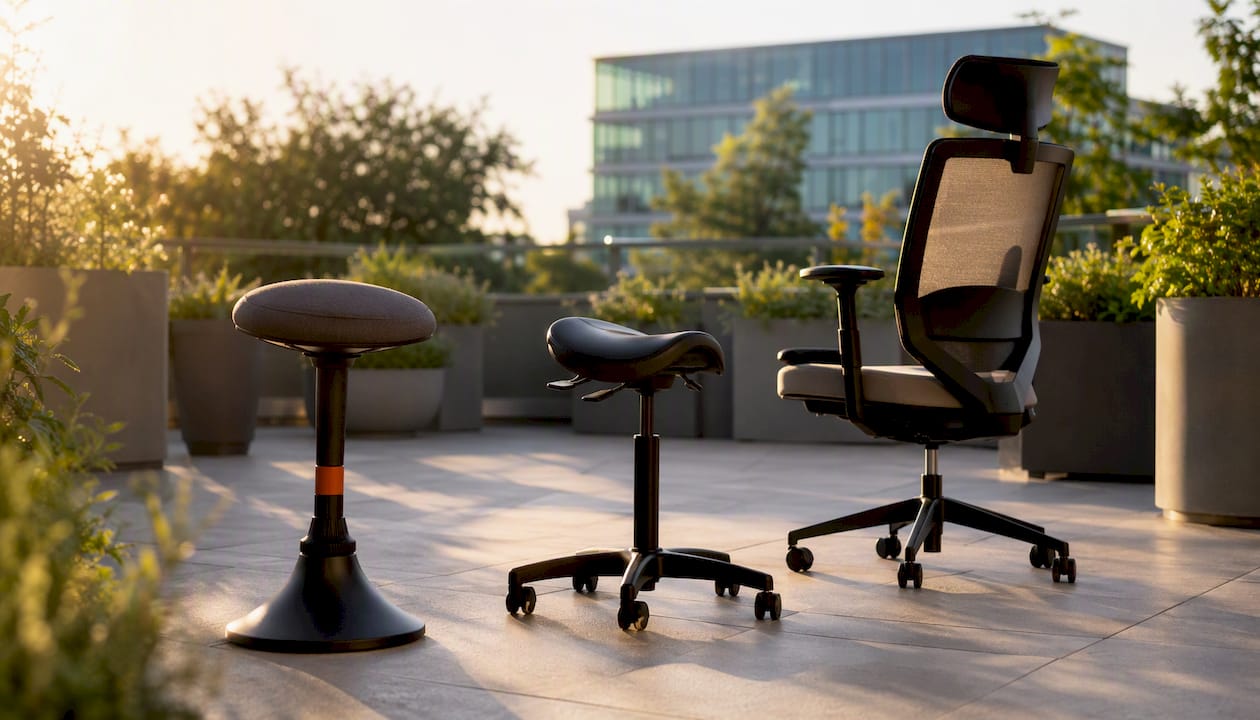
Full-adjustable task chairs suit all-day desk work. Active chairs and stools work best in short bursts. Saddle and kneeling chairs serve specific tasks or therapeutic protocols. The types of office chairs available vary considerably in how they distribute load and how long they remain comfortable.
| Use case | Seating type | Fit note |
|---|---|---|
| Long hours at a fixed desk | Fully adjustable ergonomic task chair | Best all-day support; lumbar and pelvic adjustment critical |
| Shared hot-desking | Heavy-duty task chair with wide adjustment range | Must accommodate varied body sizes quickly |
| Short-duration active sitting | Wobble stool or balance chair | Engages core; not suitable as a sole chair for full shifts |
| Clinical / rehab use | Saddle or kneeling chair (therapist-guided) | Specific pelvic positioning; requires professional guidance |
Pelvic-focused seats (saddle chairs, forward-tilt stools) are useful for users who already have good core strength and want to vary their sitting position. They tend to fatigue users who are deconditioned or who have existing lower back issues. Fixed lumbar supports, by contrast, work better for users who need passive support throughout the day but carry a risk of becoming a crutch that reduces core engagement over time.
A practical middle ground for most UK offices: a fully adjustable task chair as the primary seat, with a height-adjustable desk that allows standing intervals. For teams considering design soft seating for breakout areas, keep in mind that lounge-style seating is not a substitute for a task chair during focused work.
The single most impactful adjustment is seat height. Get that right first, then work outwards.
HSE’s workstation setup guidance is clear that chair adjustments only deliver their full benefit when desk, monitor, and keyboard heights are aligned. Adjusting the chair in isolation is a half-measure. For a full-team rollout, the workspace setup guide covers calibrating every element of the workstation together.
Schedule movement breaks every 30–40 minutes. Stand, walk briefly, or do a few shoulder rolls. The British Heart Foundation is clear that even a good ergonomic setup does not eliminate the cardiometabolic risks of prolonged unbroken sitting.

Pro Tip: To check seat depth without a ruler, sit back fully in the chair and slide three fingers horizontally behind your knee. If they fit with light pressure, the depth is correct. For monitor height, sit naturally, close your eyes, then open them — wherever your gaze lands is your ideal screen centre.
For most UK offices, three Furnitureforbusiness models cover the main use cases. WIRED’s review of professional setup services found that chairs paired with proper adjustment guidance produce measurably better outcomes than chairs used straight out of the box, which is worth keeping in mind when deploying any of these across a team.
Best for: All-day desk work, individuals with existing back discomfort, premium ergonomic requirements.
The Onyx is built around full-back and lumbar support with a high backrest that supports the thoracic spine as well as the lumbar region. Adjustability covers seat height, lumbar position, armrest height, and seat tilt. The mesh back promotes airflow across long sessions. For procurement teams equipping staff who spend six or more hours seated, this is the primary recommendation. Price band: mid to premium.
Best for: Shared hot-desks, high-turnover environments, users requiring a higher weight capacity.
The OE Austin is built for durability and repeated adjustment across multiple users. The PU upholstery is easy to clean, which matters in shared settings. Seat height and back angle adjust to accommodate a wide range of body sizes. For call centres, reception desks, or any setting where the chair sees multiple users per day, the Austin’s build quality justifies the investment. Price band: mid.
Best for: Executive offices, boardrooms, occasional-use visitor seating.
The OE Saturn combines a professional aesthetic with practical ergonomics. The folding arms make it easy to position at a desk or pull up to a conference table without the armrests getting in the way. Support focus is lumbar and mid-back. For senior staff who split time between desk work and meetings, it offers a cleaner profile than a full task chair without sacrificing adjustability. Price band: mid to premium.
| Model | Best for | Support focus | Material | Price band |
|---|---|---|---|---|
| Onyx High Back Ergonomic | All-day desk work | Full-back and lumbar | Mesh back | Mid to premium |
| OE Austin Heavy Duty | Shared / hot-desk | Lumbar and seat | PU upholstery | Mid |
| OE Saturn Executive | Executive / boardroom | Lumbar and mid-back | Upholstered | Mid to premium |
All three models are available with free delivery to the UK mainland. For bulk orders, Furnitureforbusiness offers volume pricing. Trial and return terms are available on request before committing to a large order.
If pain persists after two to four weeks of correct seating and a properly set-up workstation, seek clinical assessment. A chair addresses the environment; it cannot diagnose or treat an underlying condition.
Red flags that warrant prompt clinical attention:
CUH’s ergonomics guidance recommends consulting a physiotherapist or occupational health professional when postural symptoms do not resolve with environmental changes. Log your symptoms alongside your chair settings so a clinician can see whether adjustments have made any difference.
Practical next steps if the chair alone is not resolving the issue:
At Furnitureforbusiness, we supply ergonomic seating to UK businesses ranging from small professional offices to large corporate fit-outs. The questions we hear most often from procurement teams are about durability, adjustment range, and what happens if a chair does not work out after delivery.
Our answer on all three: the Onyx, OE Austin, and OE Saturn are specified for commercial use, not domestic. They are built to withstand the daily demands of a shared office environment. Free delivery covers the UK mainland, and bulk pricing is available for orders equipping larger teams. For buyers who want to trial a model before committing to a full floor order, we recommend getting in touch directly to discuss return terms.
For teams integrating new seating into a wider workspace refresh, the ergonomic workspace checklist covers the full picture: desk heights, monitor placement, accessories, and how to brief staff on adjusting their own setup. Consider also exploring home office storage options for a productive space to complement ergonomic seating with efficient storage solutions. Pairing a good chair with a properly calibrated workstation is where the real improvement happens.
Furnitureforbusiness gives UK procurement teams a direct route to commercial-grade posture seating without the lead times or minimum order complexity of a traditional contract furniture supplier. Free UK mainland delivery, documented warranty terms, and bulk pricing mean you can equip a team of five or fifty without separate freight negotiations.
The practical next step: browse the full office chairs range to compare models side by side, or go directly to the Onyx, OE Austin, or OE Saturn product pages to check current stock and specifications. For orders covering multiple workstations, request a bulk quote through the site. If you want to trial a model before a full rollout, contact the team to confirm return terms before placing the order.

Phone: 0330 043 4114
VAT no. GB 991 8681 60
Company no. 07250570