Tilt tension controls how hard your chair pushes back when you lean, and the round knob under the seat sets that resistance: turn it clockwise to increase resistance, anticlockwise to reduce it. That single adjustment solves most recline complaints. If the knob seems to do nothing or you can’t find it, the step-by-step guide below will help you track it down.
TL;DR:
- Set seat height and lumbar support first, then adjust in quarter turns and test recline while seated, stopping when movement feels controlled.
- Heavier people usually need more resistance, while lighter people need less; shared chairs should start at a middle setting that accommodates both.
- Tension changes reclining effort, while tilt lock fixes the backrest; disengage the lock if the chair will not recline before changing tension settings.
- Stop and contact facilities support if the knob spins freely, the mechanism grinds or has visible cracks, or the gas lift seems affected.
Tilt tension is the spring resistance that pushes your chair’s backrest forward again after you lean back. Turn the tension up and the chair feels firmer, resisting your weight; turn it down and the backrest moves more freely with less effort. It sits inside the tilt mechanism, the metal unit under the seat pan that lets the chair recline at all.
Tilt tension is often confused with tilt lock, but they do different jobs. Tension adjusts how much force the recline requires. Lock fixes the backrest at a chosen angle so it won’t move at all, regardless of tension setting. Many manufacturer support pages describe tilt lock as a separate lever or button from the tension knob, which is why some chairs have two distinct controls near each other under the seat.
A synchro mechanism adds a third layer: it links the backrest and seat pan so both move together at a set ratio when you recline, rather than the backrest alone pivoting. Tension still governs resistance on a synchro chair; it just affects a more coordinated motion.
Your own body weight changes how any given tension setting feels:
This is why a chair that felt right for a previous user may need resetting before it suits you.
Before adjusting anything, confirm what you’re actually looking at. Office chairs commonly use a mix of levers, knobs and paddles under the seat, and it’s easy to turn the wrong one.
If nothing changes after a few test turns, you may be adjusting a different control, such as seat depth or armrest height, rather than tension.
When documenting a chair for an office manual or training sheet, a simple close-up photo of the underside with the tension knob circled is far more useful than a written description alone, since knob shapes and positions vary between brands.
Getting tilt tension right takes a few minutes and a bit of trial and error, but the process is straightforward if you work through it in order.
Pro Tip: If you share a chair with colleagues, a small label near the knob reading, “turn clockwise to tighten,” saves everyone from guessing each time they sit down.
Heavier users typically need to turn the knob several increments towards the tighter end to stop the chair reclining too easily, while lighter users often need to loosen it from the factory default to recline comfortably at all. There’s no universal setting that suits everyone, which is exactly why the adjustment exists.
Most tilt tension problems fall into a handful of recognisable patterns, and most have a simple fix before you need to call anyone in.
Quick checks worth trying before escalating: confirm the lock lever is in the unlocked position, turn the chair over or tip it back carefully to check for visible debris around the mechanism, and make sure the tension knob itself is seated correctly and not loose on its shaft.
Stop adjusting and bring in facilities support or a qualified technician if you notice a stripped knob that spins freely without effect, a grinding or metallic noise from the mechanism, visible cracks in the mechanism housing, or any sign the gas lift cylinder is involved, since gas lift issues affect seat height stability and are a safety matter rather than a tension problem.
Routine care keeps a tilt mechanism working smoothly for years. Facilities teams should check mechanisms periodically rather than waiting for a complaint.
Pro Tip: Keep a simple log of which chairs have had mechanism issues; a chair that needs repeated tension adjustments or repairs within a short period is often cheaper to replace than to keep servicing.
Persistent looseness that won’t hold any tension setting, metallic grinding noises, visible structural damage to the mechanism housing, or any safety failure such as a lock that won’t hold are all signs it’s time to consider replacement rather than further repair.
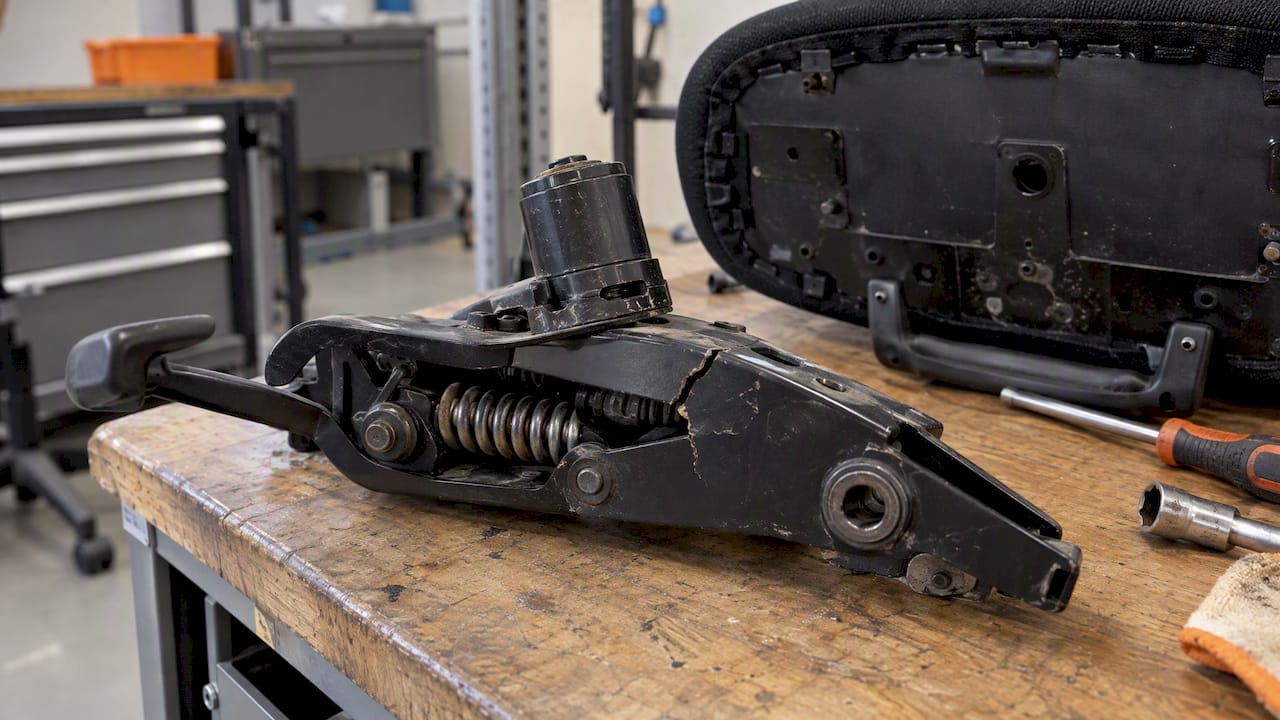
Correctly set tilt tension reduces the steady stream of comfort complaints that facilities teams often field after a fit-out or a desk reshuffle. A chair that’s too stiff or too loose for its user gets blamed on the chair itself, when a two-minute adjustment usually fixes it.
Building tilt tension checks into onboarding or periodic reviews is worth the effort, particularly for shared desks or hot-desking setups where several body types use the same seat across a week. Our posture chair guidance and ergonomic workspace checklist are useful references when specifying new seating or auditing an existing fleet, and our executive chair adjustment reference gives managers a quick list of controls to check during handovers.
— Furniture
We supply office chairs with accessible, clearly positioned tilt tension controls, so facilities teams spend less time fielding comfort complaints and more time on everything else.

Our range covers task seating, executive chairs and posture-focused designs, including options in our mesh chair collection for breathable, adjustable everyday seating. Bulk orders come with bundle pricing, and every order ships free to the UK mainland with a straightforward returns process if a model doesn’t suit your team.
Get in touch for a quote or specification support, and we’ll help you match tilt mechanisms and chair features to your team’s size and working patterns.
Release the tilt lock if one is engaged, then lean back gently while seated; the backrest will recline according to the tilt tension setting. If it feels too stiff or too loose, turn the round knob under the seat clockwise to tighten or anticlockwise to loosen.
“ADHD chair” isn’t an official product category; it’s a term sometimes used informally for active or wobble seating that allows more movement than a standard office chair. Definitions vary, and no single design is universally labelled this way in furniture specifications.
Most swivel chairs have a separate tilt lock lever or button near the tension knob, and engaging it fixes the backrest at whatever angle it’s currently in. This is distinct from tilt tension, which only adjusts resistance rather than locking the chair in place.
The round knob under an office chair seat typically controls tilt tension, which is the spring resistance that determines how much effort it takes to recline. Turning it clockwise increases resistance, while turning it anticlockwise makes the chair recline more freely.

Phone: 0330 043 4114
VAT no. GB 991 8681 60
Company no. 07250570