TL;DR:
- An ergonomic workspace checklist provides measurable criteria to support employee health and comfort. Regular audits, proper equipment placement, movement breaks, and furniture adjustments are essential for sustained workplace well-being. Ongoing staff self-awareness and cyclical reviews improve long-term posture and reduce musculoskeletal disorders.
A checklist for ergonomic workspaces is a structured set of measurable criteria that ensures every workstation component supports employee health, comfort, and efficiency. In the UK, office managers and HR professionals are under growing pressure to reduce musculoskeletal disorders, which cost businesses significant sums annually and directly affect retention and performance. The right ergonomic setup checklist covers chair height, monitor position, keyboard placement, lighting, and movement breaks. Getting these elements right is not a one-off task. It is a cyclical process that requires regular audits and employee engagement to deliver lasting results.
Chair height is the foundational adjustment in any ergonomic setup. Every other measurement, including desk height, monitor position, and keyboard placement, flows from this single starting point. If you set the chair incorrectly first, every subsequent adjustment compensates for that error and compounds strain elsewhere.
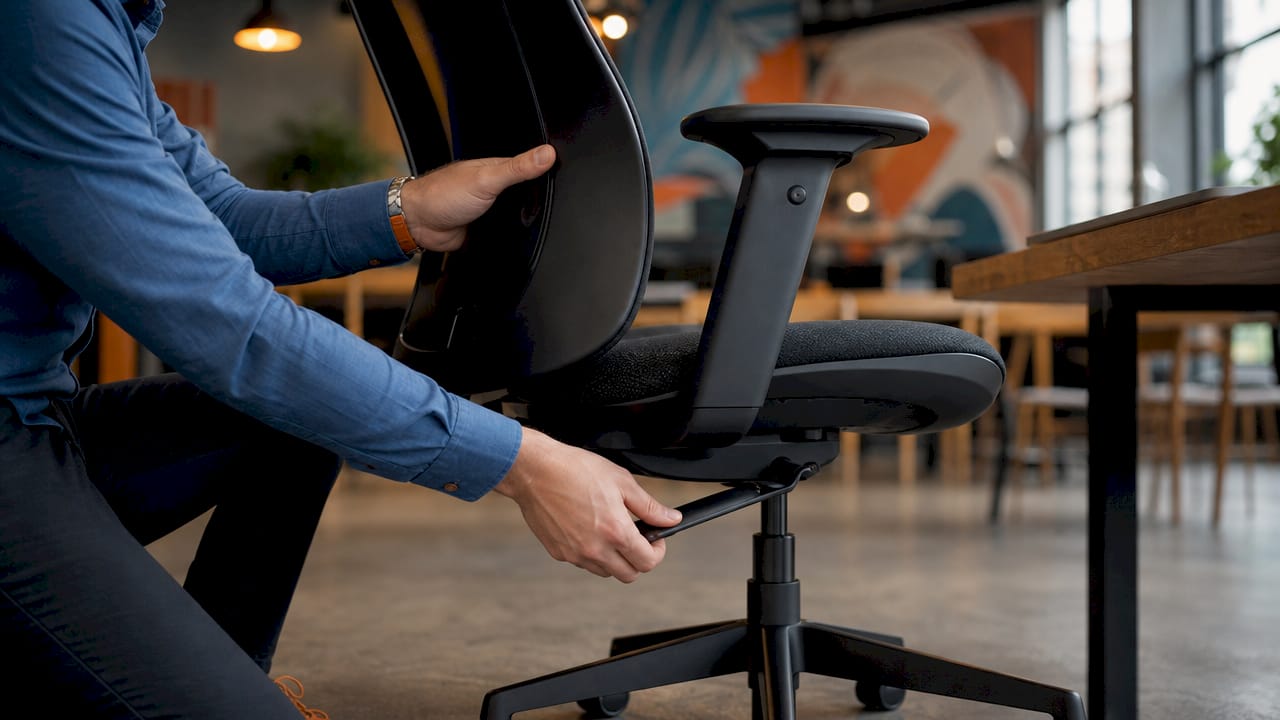
The correct sequence is: chair height, then desk height, then monitor position, then keyboard and mouse placement. Set the chair so your feet rest flat on the floor and your knees sit at roughly 90 degrees. From there, adjust the desk so your elbows rest at the same 90-degree angle when your hands are on the keyboard. Only then position the monitor.
Pro Tip: Run a 10-minute audit at each workstation by sitting in the chair, placing hands on the keyboard, and checking five points in order: feet flat, knees at 90 degrees, elbows at 90 degrees, monitor at eye level, and wrists straight. This sequence catches the most common setup failures in under 10 minutes.
Skipping this sequence is the most common mistake office managers make. Employees who set their monitor first and then adjust the chair often end up with a compromised posture that no amount of lumbar support can fully correct. Priority order must start with chair height; misalignment there invalidates all other adjustments.
The chair is the single most important piece of furniture for ergonomic workspaces. A chair without the right adjustable features cannot support neutral posture, regardless of how well everything else is set up.
The key features to check are:
When procuring chairs for a team, prioritise models that offer all five adjustments rather than fixed-specification chairs. A chair that fits one employee perfectly may cause strain for another. The types of office chairs available vary considerably in their adjustment range, so check specifications carefully before bulk ordering.
Equipment placement is where most workstation setups fall short. The measurements are specific and non-negotiable for genuine ergonomic benefit.
| Equipment | Correct setting | Common error |
|---|---|---|
| Monitor distance | 50–70 cm from eyes | Too close, causing eye strain |
| Monitor height | Top edge at or just below eye level | Too low, causing neck flexion |
| Desk height | 71–76 cm with elbows at 90 degrees | Fixed height not adjusted per user |
| Keyboard position | Flat or slightly negative tilt, close to body | Raised tilt causing wrist extension |
| Mouse position | Same level as keyboard, within easy reach | Too far right, causing shoulder strain |
Monitor height is the most frequently ignored adjustment. Employees who use laptops without a separate monitor or stand almost always work with the screen too low. A monitor arm or stand corrects this immediately and costs far less than the physiotherapy bills that follow prolonged neck flexion. For teams using height adjustable desks, these measurements shift each time the desk moves, so employees need to understand how to recalibrate quickly.
Static posture is the underlying cause of most office-related musculoskeletal complaints. The quality of the chair matters far less than frequency of posture change supported by regular movement breaks.
Employees should take 1–2 minute movement breaks every 20–30 minutes to reduce physical stress accumulation. That is not a suggestion. Research confirms that regular microbreaks reduce long-term chronic pain risks associated with static posture. The challenge for office managers is making this habit stick without disrupting workflow.
Practical break activities that work in open-plan offices include:
Pro Tip: Set a shared calendar reminder for the whole team every 30 minutes labelled “posture reset.” It normalises the habit, removes the social awkwardness of being the only person who stands up, and costs nothing to implement.
The goal is not perfect posture. Focusing on neutral support rather than perfect posture keeps employees engaged and prevents the fatigue that comes from trying to hold a rigid position all day.
Lighting is the most overlooked item on any ergonomic workspace checklist. Poor lighting contributes to eye strain and poor posture as employees lean forward or squint at screens. Neither a perfectly adjusted chair nor an expensive monitor arm compensates for a badly lit workstation.
The key lighting and environment checks are:
Clutter and a disorganised environment affect posture and focus in ways that are easy to underestimate. A tidy, well-lit workstation reduces the unconscious micro-adjustments employees make throughout the day, each of which adds cumulative strain. Workspace organisation tips for UK office managers cover this in detail and are worth reviewing alongside any ergonomic audit.
A one-time ergonomic setup fails. Cyclical quarterly ergonomic audits with 20–30 minute reviews per workstation are more effective than reactive-only approaches. Employee needs change: weight fluctuates, injuries occur, new equipment arrives, and desk-sharing arrangements shift. A setup that was correct in january may be wrong by april.
Training employees on quick self-audits is more effective than purchasing expensive equipment alone. When employees understand why each adjustment matters, they self-correct throughout the day rather than waiting for a formal review. This is the difference between ergonomics as a one-off compliance exercise and ergonomics as a genuine workplace health practice.
The quarterly audit schedule should include a brief review of each workstation against the checklist, a conversation with the employee about any new discomfort, and an update to the equipment specification if needed. For HR professionals managing large teams, a digital checklist shared via your intranet makes this process repeatable and auditable. The workspace setup guide for professional teams from Furnitureforbusiness provides a practical framework for structuring these reviews.
A correctly sequenced ergonomic setup, combined with regular movement breaks and quarterly audits, is the most effective way to reduce musculoskeletal disorders and protect employee productivity.
| Point | Details |
|---|---|
| Chair height comes first | Set chair height before adjusting any other workstation element to avoid compensatory strain. |
| Equipment measurements are specific | Monitor at 50–70 cm, desk at 71–76 cm, and lumbar support at L3–L4 for genuine ergonomic benefit. |
| Movement breaks are non-negotiable | A 1–2 minute break every 20–30 minutes reduces chronic pain risk more than chair quality alone. |
| Lighting and environment matter | Poor lighting and desk clutter cause posture problems that furniture adjustments cannot fix. |
| Audits must be cyclical | Quarterly reviews with employee self-audit training outperform one-time ergonomic setups. |
The most common mistake I see is treating ergonomics as a procurement decision rather than a behaviour change programme. Offices spend significant budgets on adjustable office chairs and then watch employees push the lumbar support to its lowest setting and never touch it again. The chair is only as good as the person sitting in it knows how to use it.
The second mistake is the one-time audit. I have seen well-intentioned HR teams conduct a thorough ergonomic review in september, tick the compliance box, and then do nothing until a member of staff raises a formal complaint six months later. Ergonomics is not set and forget. Employee awareness and self-adjustment prevent chronic strain. Without that ongoing engagement, even the best furniture becomes irrelevant.
What actually works is simpler than most people expect. Teach employees the five-point sequence: feet, knees, elbows, monitor, wrists. Give them permission to stand up every 30 minutes without feeling self-conscious. Run a 20-minute quarterly check. The results are not dramatic on any single day, but over a year they are measurable in reduced sick days, fewer physiotherapy referrals, and employees who report feeling better at work. That is the return on investment that justifies every pound spent on ergonomic furniture.
— Furnitureforbusiness
Furnitureforbusiness supplies UK offices with the furniture that makes this checklist deliverable in practice.

The range includes adjustable office chairs with full lumbar, armrest, and seat depth adjustment, office desks including height-adjustable sit-stand options, and office accessories such as monitor stands, footrests, and keyboard trays. All products are available with free delivery to the UK mainland, and bulk order pricing is available for teams fitting out multiple workstations. If you are reviewing your office ergonomics programme, the product range gives you the physical tools to match the checklist items covered above.
A checklist for ergonomic workspaces is a structured list of measurable workstation criteria covering chair height, monitor position, keyboard placement, lighting, and movement breaks. It is used to assess and correct each workstation systematically rather than relying on employee guesswork.
Chair height should be set so your feet rest flat on the floor and your knees sit at approximately 90 degrees. This is the first adjustment to make, as it determines the correct position for the desk, monitor, and keyboard.
Quarterly ergonomic audits are the recommended frequency for sustained health outcomes. One-time setups fail because employee needs change and equipment shifts over time.
The monitor should sit 50–70 cm from the eyes, with the top edge at or just below eye level. This distance reduces eye strain and prevents the neck flexion caused by a screen that is too low or too close.
Yes. Taking a 1–2 minute movement break every 20–30 minutes reduces the physical stress that accumulates from static posture. Research confirms that microbreaks lower long-term chronic pain risk more reliably than chair quality alone.

Phone: 0330 043 4114
VAT no. GB 991 8681 60
Company no. 07250570