For long meetings, choose chairs that provide a consistent baseline of lumbar support, correct seat height and a simple, intuitive mechanism, not a collection of complex per-user adjustments. That single principle beats chasing extra levers and dials, because meeting chairs serve many different bodies with no training and no time to fiddle. This guide covers the features that matter, a procurement checklist and quick fixes attendees can use mid-meeting.
TL;DR:
- Chairs should have fixed lumbar support and automatic tilt mechanisms that activate with the user to ensure consistent comfort for diverse bodies.
- Simple, weight-activated recline features outperform manual adjustments, reducing maintenance costs and the need for instruction.
- Exact order details, durability ratings, accessibility options, and proper space planning are critical to ensure long-term functionality and comfort.
- Attendees can improve posture quickly by adjusting their seating to fit the 90-90-90 rule and using footrests if necessary.
- Chairs designed for shared spaces should prioritize uniform support and support small movements to enhance focus and reduce musculoskeletal discomfort.
A meeting chair earns its place by doing four things well for a wide range of bodies, not by offering the most settings. Seat height needs a range that lets most adults rest their feet flat with knees roughly level with hips, which is the basis of the 90-90-90 posture check used in workplace guidance. Seat depth matters just as much: a seat that runs too long presses the front edge into the back of the knee, cutting circulation long before the meeting ends, so a rounded or waterfall front edge is worth specifying.
Lumbar support does not need to be motorised. A well-shaped fixed lumbar curve, built into the backrest itself, often performs better across a group of users than an adjustable pad that nobody resets between meetings. Backrest tilt should move with the user automatically rather than demand a lever pull, and armrests work best when fixed or simply height-set, with a narrow, set-back profile so the chair can slide close to the table.
Pro Tip: If a room serves both quick stand-ups and two-hour workshops, specify one chair with good fixed support rather than two chair types. Consistency reduces confusion and complaints.
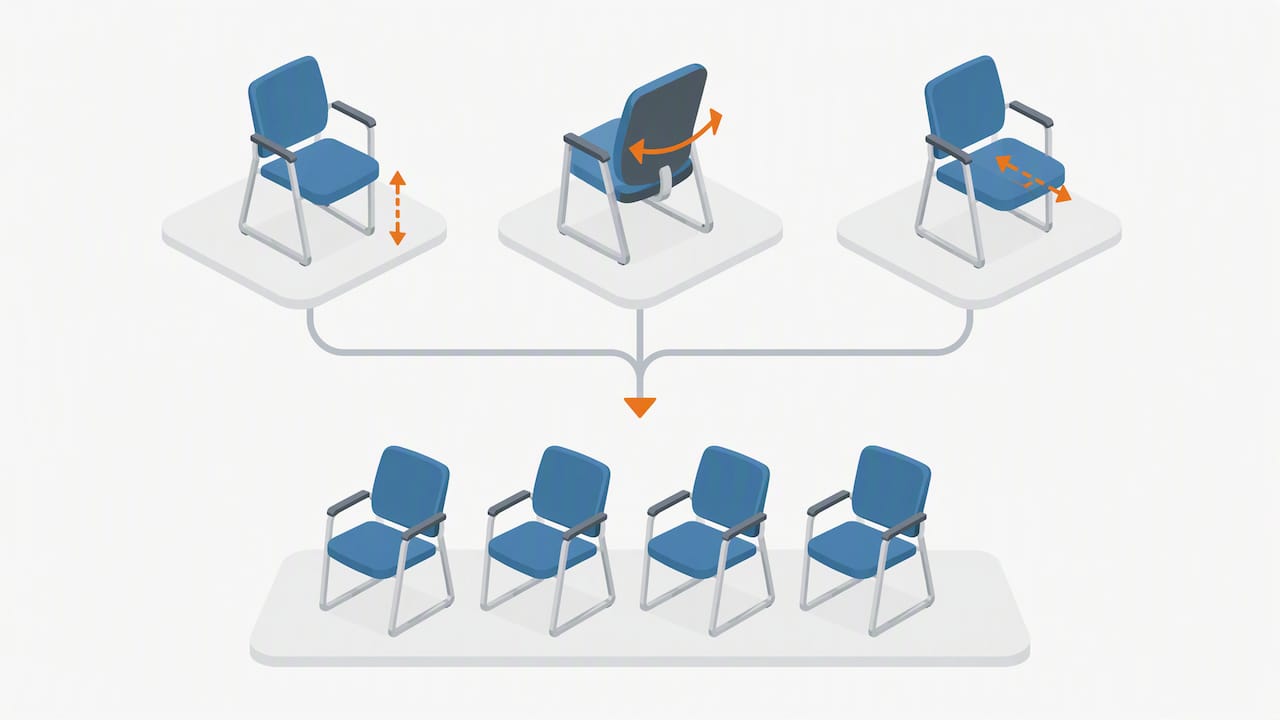
Most people attending a meeting will not learn, or want to learn, how to operate five separate levers before the agenda starts. Procurement guidance on ergonomic equipment points out that weight-activated mechanisms often outperform manual ones in shared settings precisely because they need no instruction. A chair that tilts correctly the moment someone sits down delivers more real-world benefit than a chair with perfect settings nobody finds.
Complexity also costs money after purchase. Extra adjustment points mean more moving parts, more wear, and more call-outs when a lever sticks or a lumbar dial seizes.
Specify features that work the moment someone sits down, not features that work only if someone reads the manual first.
Buying for a shared room is a different exercise from buying a desk chair for one person, and it pays to work through the decision in order.
Pro Tip: Keep one sample chair from the accepted batch in storage as a reference for colour and finish when ordering replacements months later.
Attendees rarely adjust a chair before sitting down, but three seconds of setup prevents an hour of stiffness.
A dynamic-chair study found that a swinging-seat design increased chair motion and task-transition movement but produced only small changes in trunk muscle activation, so treat small shifts and short standing breaks every 30 to 45 minutes as the more reliable fix for stiffness.
Chairs need room to move, and the wrong floor fitting undoes good ergonomics fast. Allow enough clearance behind the table for a chair to push back fully and for someone to walk past without squeezing through, following the spacing used in standard conference room sizing.
The research on ergonomic seating is encouraging but modest, and procurement decisions should reflect that honestly. HSE’s seating guidance sets out the checks that matter most: adjustable seat height, adequate lower-back support, a rounded front edge and armrests that do not block close approach to a desk or table.
Ergonomic interventions reduce some musculoskeletal pain measures, but chairs alone are not a standalone cure.
Pairing a good chair with movement breaks and sensible workstation set-up delivers more than the chair can on its own.
Our approach starts from the same principle as this guide: a shared room needs consistent baseline support across every chair, not a few highly adjustable outliers. Buyers can match SKUs and finishes across bulk orders, with delivery options that facilitate testing a sample in the actual room before a full order goes ahead. If you are specifying a new meeting space, an audit of the current seating or a small trial order is a sensible first step.
— Furniture
Specifying chairs for a shared space is easier when the range, the pricing and the delivery terms are sorted in one place. Our office chairs range covers mesh, padded and stackable options suited to meeting and conference use, and our meeting room collection bundles chairs with tables for a consistent fit-out.
Returns are possible within a defined period if a chair does not suit the room, and delivery to UK locations is included in service terms. Get in touch to request samples or a quote for your next fit-out.
The 90-90-90 rule is a quick check where hips, knees and elbows each sit at roughly a right angle while feet rest flat on the floor. It is used as a fast way to judge whether a chair and desk combination is set at the right height, and it features in HSE seating guidance.
Proper use means sitting fully back so the lumbar curve supports the lower back, keeping feet flat or on a footrest, and setting the seat height so knees sit level with hips. HSE guidance also recommends a rounded front edge and armrests that do not stop the chair sliding close to the desk.
There is no single best chair, but the features that matter most for long sitting are a supportive lumbar curve, an adjustable or correctly ranged seat height, adequate seat depth and a tilt mechanism that moves with the body. Our office chairs range includes mesh and padded options built around those same criteria for shared office use.
People with ADHD, like many adults, often shift position, fidget or move more than average while seated, and research on fidgeting and attention suggests allowing small movement can support focus rather than disrupt it. Seating that tolerates some movement, rather than locking a person into one fixed posture, tends to suit this better.

Phone: 0330 043 4114
VAT no. GB 991 8681 60
Company no. 07250570