TL;DR:
- Home-from-home office design creates a comfortable, ergonomic workspace that supports both productivity and wellbeing.
- It uses layered lighting, acoustic control, and visual boundaries to adapt to diverse tasks and moods at home.
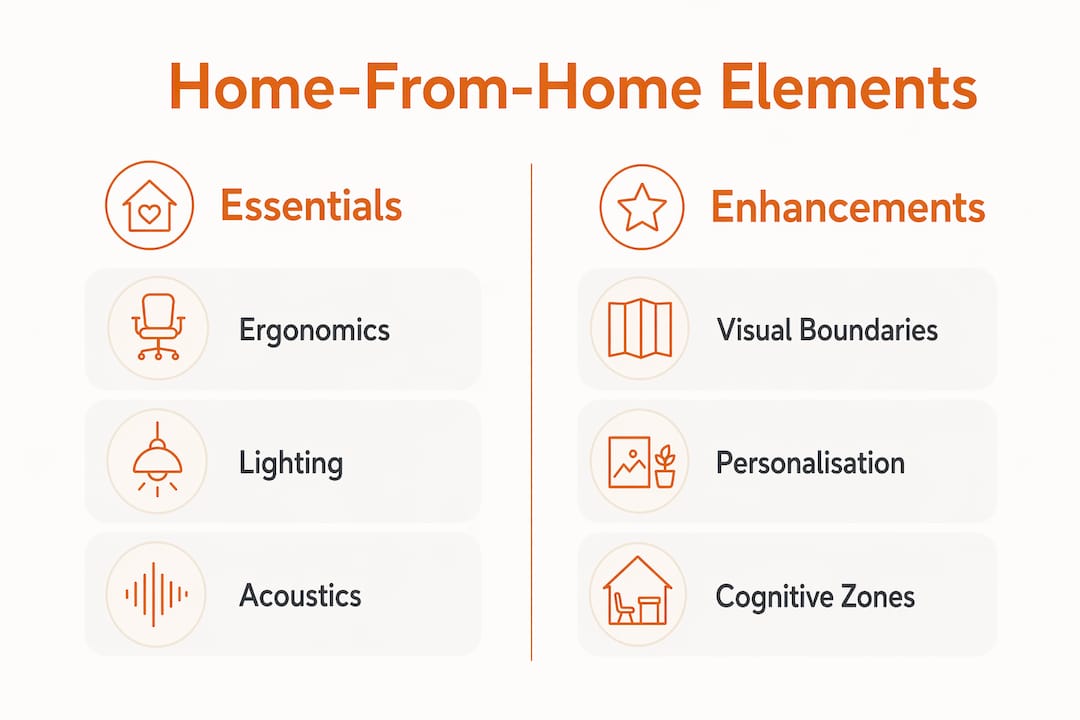
Home-from-home office design is defined as a workspace approach that replicates the comfort, warmth, and personal character of a living space while maintaining the structure and functionality needed for professional work. The concept sits at the intersection of interior design and ergonomic science, and it has become the dominant model for remote workers who spend full working days at home. Unlike a bare desk in a spare room, this approach layers ergonomic bones, atmospheric elements, and personal touches to create a space that genuinely supports both output and wellbeing. The OE Saturn Executive Chair, height-adjustable desks, and layered lighting are among the physical building blocks that define the approach.
Home-from-home office design is the practice of building a workspace that feels as considered and comfortable as the rest of your home, without sacrificing the conditions needed for focused, professional work. The term is informal rather than a recognised industry standard. Interior designers and workplace consultants typically refer to the same concept as biophilic workspace design, residential-style office design, or simply human-centred workspace design. Both the informal and formal terms describe the same goal: a space that does not feel clinical or temporary.
The core principle is balance. Ergonomics, atmosphere, and personalisation must work together. A chair that supports your spine for eight hours matters as much as the colour of your walls. Successful home-from-home design layers these three elements to create a workspace that is cohesive, health-supporting, and genuinely pleasant to occupy.
The foundation of any productive workspace is ergonomics. Your chair, desk height, and monitor position determine whether you can work comfortably for a full day or spend the afternoon managing back pain.
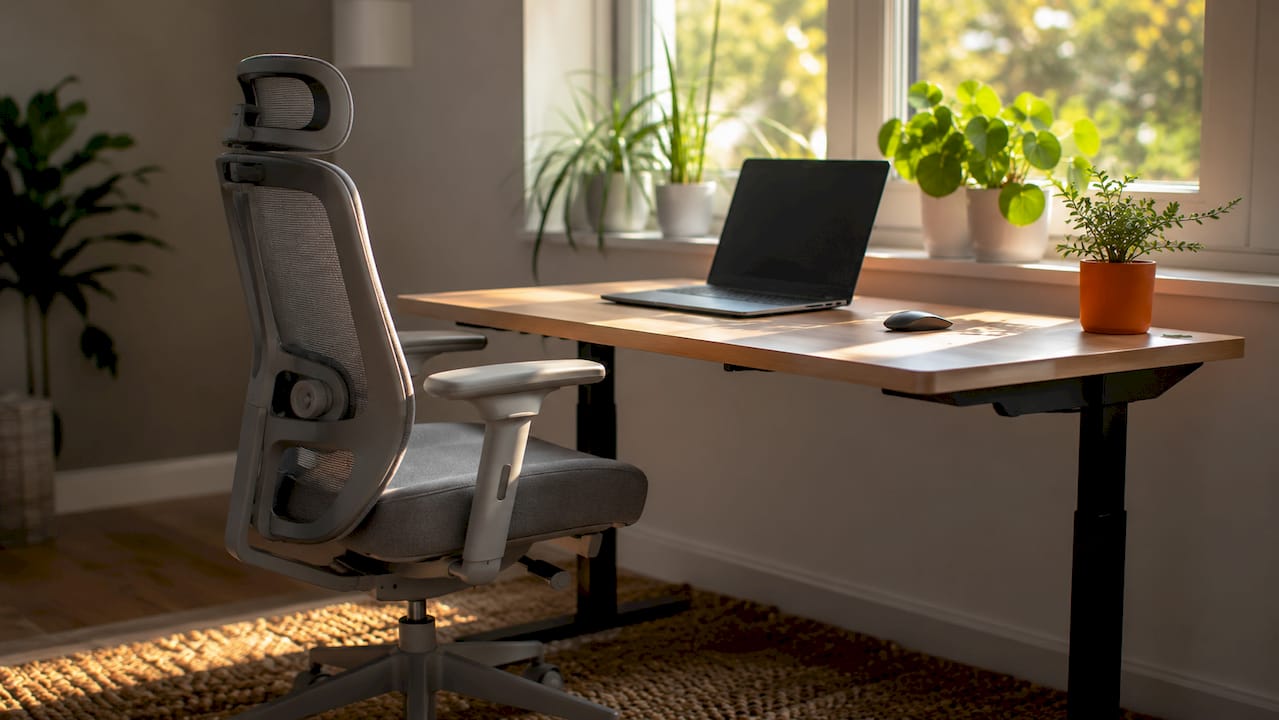
Ergonomic chairs are more important than desks for protecting long-term health in a home office. That means your chair budget should be your largest single furniture investment. The OE Saturn Executive Chair with folding arms is a strong example of a chair designed for all-day use, with lumbar support and adjustable arms that reduce shoulder strain. Your monitor should sit at eye level, roughly an arm’s length away, to prevent neck fatigue. A height-adjustable desk, such as the Air Height Adjustable Slimline Desk with Cable Ports, lets you alternate between sitting and standing throughout the day.
Proper lighting uses three layers: ambient light for general illumination, task light directed at your work surface, and accent light to reduce harsh contrast between bright screens and dark surroundings. Most home offices rely on a single overhead bulb, which creates glare and eye strain within hours. Adding a desk lamp with adjustable colour temperature and a small accent light behind your monitor costs little but makes a measurable difference to comfort and focus.
Pro Tip: Position your desk perpendicular to a window rather than facing it or sitting with your back to it. This eliminates screen glare while keeping natural light in your peripheral vision, which reduces fatigue.
Acoustic attenuation using soft fabrics and rugs improves both call quality and concentration. Hard floors and bare walls reflect sound, making video calls exhausting and background noise distracting. A rug under your desk, curtains on the windows, and a bookshelf behind you absorb sound without requiring structural changes. Visual boundaries matter equally. Even in a shared or open-plan space, a defined zone signals to your brain that work is happening here. Flexible visual boundaries like shelving or rugs preserve openness while creating a psychological separation between work and home life.
The evidence for well-designed home offices is clear. A 2026 HHU study on flexible hybrid work found that workers with flexible home office arrangements report higher productivity, greater satisfaction, and reduced stress compared to those in rigid working models. The implication is direct: the physical environment you create at home shapes how well you perform, not just how comfortable you feel.
“Home offices are not inherently unproductive. With proper resources and thoughtful design, they can increase both output and wellbeing.” — HHU research, 2026
The Leesman Index research identifies visual separation, acoustic control, and lighting quality as the three factors that account for the largest share of satisfaction and output in home offices. Each of these is a design decision, not a fixed condition. You can address all three without a full renovation. Hybrid models that emphasise choice over rigid schedules consistently outperform fixed arrangements in performance metrics. That finding reinforces the value of designing a space that can adapt to different tasks and moods throughout the day.
Cognitive recovery zones are a less-discussed but important element. A small seating area away from your desk, even a single armchair, gives your brain a place to decompress between deep-focus sessions. This is not a luxury. It is a practical tool for preventing the mental fatigue that accumulates when work and rest occupy the same physical spot.
The traditional home office was a dedicated room with a fixed desk, a desktop computer, and a door you could close. It worked well for those who had the space, but it was inflexible and often felt disconnected from the rest of the home.
| Feature | Traditional home office | Home-from-home model |
|---|---|---|
| Layout | Fixed, single-purpose room | Modular, adaptable zones |
| Furniture | Static desk and chair | Height-adjustable, moveable pieces |
| Boundaries | Physical walls and door | Visual cues: rugs, shelving, lighting |
| Atmosphere | Functional, often sparse | Layered: ergonomic, aesthetic, personal |
| Space use | Dedicated room required | Works in shared or open-plan spaces |
The Home Office 2.0 trend reflects a shift towards modular, broken-plan designs that use sliding panels, internal glazing, and moveable furniture to reclaim living space when work ends. This approach suits the reality of UK homes, where a dedicated office room is often not available. Advanced broken-plan offices use visual cues like shelving units or area rugs instead of walls to define workspace zones without permanent structural changes.
Pro Tip: If you share your workspace with a living area, use a consistent lighting scene to signal work mode. Switching on your desk lamp and dimming the overhead light takes ten seconds and tells your brain the workday has started.
The trade-off with adaptable layouts is discipline. A space that converts easily between work and leisure can blur the psychological boundary between the two. Ritual-based approaches address this directly. Specific rituals like desk clearing or changing lighting help mentally separate the start and end of the workday, reducing the cognitive overload that comes from blurred work and home boundaries.
Creating a productive workspace does not require a large budget or a dedicated room. The following priorities give you the best return on investment.
A few additional home office essentials round out the setup:
Pro Tip: When designing a comfortable office in a small space, choose furniture with a visual footprint smaller than its functional one. A wall-mounted desk or a slimline height-adjustable desk takes up far less visual space than a traditional corner unit, making the room feel larger when you are not working.
Home-from-home office design works because it combines ergonomic structure, layered lighting, acoustic control, and personal character to create a workspace that supports both performance and wellbeing.
| Point | Details |
|---|---|
| Ergonomics come first | Prioritise your chair above all other furniture; it has the greatest impact on long-term health. |
| Lighting drives productivity | Use ambient, task, and accent layers to reduce eye strain and improve focus throughout the day. |
| Acoustics are non-negotiable | Rugs, curtains, and soft furnishings reduce echo and improve call quality in any room. |
| Visual boundaries replace walls | Shelving, rugs, and lighting scenes define your workspace without structural changes. |
| Flexibility beats rigidity | Adaptable, modular layouts outperform fixed setups for hybrid workers in both satisfaction and output. |
The biggest shift I have seen in home office design over the past few years is not about furniture. It is about attitude. Remote workers used to treat their home setup as a temporary measure, something to tolerate until they returned to the office. That mindset produced bad chairs, kitchen tables, and laptop screens balanced on books. The result was predictable: poor posture, low focus, and a creeping resentment of working from home.
The home-from-home model represents a genuine change in thinking. When you invest in your workspace as seriously as you invest in your living room, the results follow. The research from HHU and the Leesman Index confirms what good designers have known for years: the physical environment shapes cognitive performance directly. You cannot separate the two.
The mistakes I see most often are still the same ones. Neglecting acoustics is the biggest. People spend money on a beautiful desk and a good chair, then wonder why video calls are exhausting. The answer is almost always the room itself: hard floors, bare walls, and no soft furnishings to absorb sound. A £30 rug solves more problems than a £200 webcam.
The second most common mistake is underestimating power outlet planning. Trailing cables are not just unsightly. They are a genuine safety hazard and a constant source of friction that chips away at your focus. Plan your electrical layout before you place a single piece of furniture.
The future of home office design is ritual and adaptability. The spaces that work best are those that can shift modes: from focused solo work to video calls to an evening of reading, without feeling like any one mode is an imposition on the others. That is the real promise of home-from-home design, and it is entirely achievable with the right foundations.
— Furnitureforbusiness
A well-designed home office starts with the right furniture, and Furnitureforbusiness supplies commercial-grade pieces built for all-day use.
The OE Saturn Executive Chair delivers the lumbar support and adjustability that a full working day demands, while the range of height-adjustable desks lets you switch between sitting and standing without disrupting your workflow. Furnitureforbusiness offers free delivery to the UK mainland, with bulk order pricing for teams scaling up their home office programmes. Browse the full ergonomic office chairs collection and office accessories range to find the pieces that complete your setup.
Home-from-home office design is the practice of creating a workspace that combines the comfort and character of a home environment with the ergonomic structure and functionality needed for professional work. It prioritises ergonomics, layered lighting, acoustic control, and personal style in equal measure.
A standard home office is typically a fixed, single-purpose room. The home-from-home model uses modular furniture, visual boundaries, and adaptable layouts to create a workspace that integrates with the rest of the home and can shift between work and leisure modes.
An ergonomic chair is the highest-priority purchase, as it has the greatest impact on posture and long-term health. After seating, a quality desk lamp with adjustable colour temperature addresses the most common cause of productivity loss in home offices.
Yes. Visual boundaries such as area rugs, shelving units, and distinct lighting scenes define a workspace zone within a shared or open-plan space. These cues create the psychological separation between work and home life that a dedicated room would otherwise provide.
The 2026 HHU study confirms that workers in well-designed, flexible home office environments report higher productivity, greater satisfaction, and lower stress than those in poorly equipped or rigid setups. Visual separation, acoustic control, and lighting quality are the three factors with the greatest measurable impact.

Phone: 0330 043 4114
VAT no. GB 991 8681 60
Company no. 07250570