TL;DR:
- A workspace setup guide emphasizes the importance of ergonomic positioning, organization, and reliable connectivity for efficient work environments. It advocates for a phased approach to furniture and technology installation, prioritizing proper positioning before additional upgrades. Adjustability and tailored design are essential to accommodate diverse team needs and enhance overall productivity.
A workspace setup guide is the structured framework for building a physical and digital environment where professional teams can work comfortably, efficiently, and without unnecessary friction. The term “office fit-out” is the recognised industry standard for this process in commercial settings, though “workspace setup” covers the full scope from individual desks to team-wide layouts. Get the foundations right — ergonomic seating, desk configuration, organisation systems, and connectivity — and productivity follows naturally. Get them wrong, and no amount of expensive equipment will compensate. This guide covers every layer, from furniture selection to technology integration, with practical steps tailored to diverse team requirements.
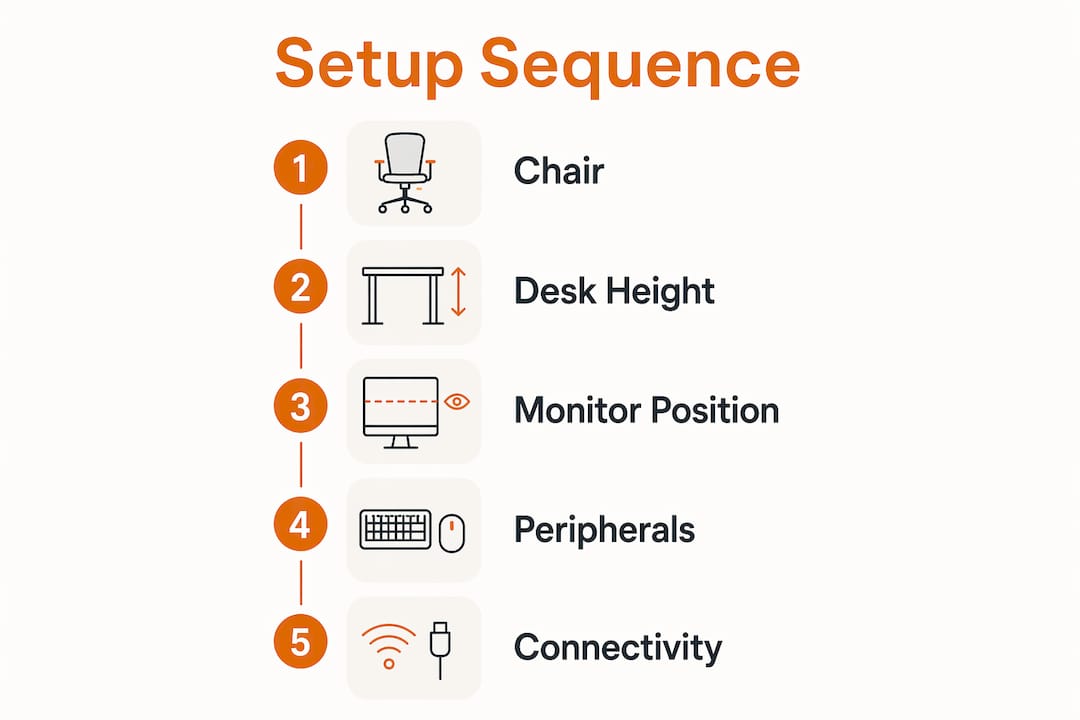
The correct setup sequence is ergonomic chair first, monitor at eye level second, then stable wired internet. Most professionals overestimate the value of expensive gear and skip this order entirely. That mistake costs them in discomfort and lost productivity long before they realise it.
An ergonomic chair is the single most important purchase in any office fit-out. Look for adjustable lumbar support, seat depth adjustment, and armrests that allow your elbows to rest at 90 degrees. The OE Austin Heavy Duty Task Chair is a strong example of a task chair that meets these requirements for daily professional use. Desk height is frequently overlooked. Correct elbow angle at 90° is the benchmark, and a footrest is recommended when desk or chair height cannot be fully adjusted to achieve it.
Height-adjustable desks add genuine value, but only when used correctly. Standing desks benefit health through regular alternation between sitting and standing, not through standing all day. Chair and monitor setup take priority before any standing desk investment.
Pro Tip: Place your primary monitor directly in front of you, never at an angle. Even a 15-degree offset causes cumulative neck strain over a working week.

An optimally designed physical workspace coupled with digital order is the foundation of professional success and employee satisfaction. Organisation is not about aesthetics. It is about reducing the cognitive load of finding things so your team can focus on actual work.
The zone system classifies items by frequency of use. Daily tools sit in the primary zone, within arm’s reach. Reference materials and occasional supplies occupy secondary zones a few steps away. Items used rarely belong in storage entirely. This single principle, applied consistently across a team, reduces desk clutter and eliminates the time lost searching for materials.
The zone system also includes a transit zone, typically a letter tray, governed by a strict one-week rule. Anything sitting in the transit zone for more than a week either gets filed or discarded. This prevents the pile-ups that derail even well-intentioned organisation efforts.
For physical storage, the right tool depends entirely on the specific clutter type. Organisational tools cannot fix clutter without first identifying whether the problem is paper, cables, or supplies. Pegboards work for tools and accessories. Drawer dividers handle stationery and small items. Lateral filing cabinets suit document-heavy roles. Explore the right office storage solutions before purchasing anything.
Physical order without digital order is incomplete. Apply the same zoning logic to your file structure: frequently accessed folders at the top level, archived materials nested deeper. Consistent file naming conventions across a team prevent the version-control chaos that wastes hours every month. A weekly email declutter, combined with folder rules in Outlook or Gmail, keeps inboxes functional rather than overwhelming.
| Organisation area | Physical approach | Digital equivalent |
|---|---|---|
| Daily tools | Primary zone, within arm’s reach | Pinned tabs, desktop shortcuts |
| Reference materials | Secondary zone, nearby shelf | Shared drive top-level folders |
| Archived items | Filing cabinet or storage room | Nested archive folders |
| Incoming items | Letter tray with one-week rule | Inbox with weekly review |
For teams managing multiple roles and working styles, arranging office desks around natural workflow patterns reduces both physical movement and cognitive switching between tasks.
A well-executed office fit-out follows a deliberate sequence rather than a single bulk purchase. Adding components weekly over eight weeks leads to better ergonomic and productivity outcomes than buying everything at once. That phased approach also lets you identify what genuinely improves your workflow before committing further budget.
Pro Tip: Do not buy a standing desk in week one. Establish your seated ergonomic baseline first. You will make a far better decision about desk height range once you know exactly where your seated position sits.
Poor desk height is the most frequent error in any workspace fit-out. Teams often set desks to a standard height and assume chairs will compensate. They rarely do. Ergonomics is primarily a positioning problem, and correct monitor height, chair seat depth, and armrest position must be addressed before any additional ergonomic products are purchased. Buying a lumbar cushion for a chair set at the wrong height solves nothing.
Reliable connectivity is the infrastructure layer that every other workspace tool depends on. A high-quality chair and a well-organised desk deliver zero value during a dropped video call or a lagging shared document session.
Microsoft Teams, Zoom, and Google Meet are the standard platforms for hybrid team communication in 2026. Each requires a stable connection, a quality webcam, and a directional microphone to function at a professional level. Cable management is not optional. Exposed cables create trip hazards, breach UK Health and Safety Executive guidelines, and make workspaces harder to reconfigure. Cable trays, velcro ties, and desk grommets are low-cost fixes with a significant impact on both safety and appearance. Two-step verification on all collaboration accounts is the baseline security requirement for any professional team.
| Connectivity tier | Speed requirement | Recommended setup |
|---|---|---|
| Basic remote worker | 25/10 Mbps | Wi-Fi acceptable, wired preferred |
| Power user or developer | 100 Mbps+ | Wired ethernet required |
| Multi-person team office | 200 Mbps+ | Managed switch with wired drops |
An effective workspace fit-out prioritises ergonomic positioning, targeted organisation, and reliable connectivity before any premium equipment purchase.
| Point | Details |
|---|---|
| Ergonomics before equipment | Adjust chair, desk, and monitor position before buying any additional ergonomic products. |
| Zone system for organisation | Place daily tools within arm’s reach and apply a one-week rule to transit zones. |
| Phased implementation | Add workspace components weekly over eight weeks for better outcomes than bulk purchasing. |
| Connectivity is infrastructure | Wired ethernet at 25 Mbps minimum is required; power users need 100 Mbps or above. |
| Budget to fit-out tier | Match your investment to your role: basic, ergonomic, or professional-grade setups each have a clear cost range. |
The most consistent mistake I see from office managers and procurement teams is buying furniture and technology in the wrong order. A standing desk arrives on day one, the ergonomic chair comes three weeks later, and the monitor arm never gets ordered at all. The result is a team that stands at the wrong height, sits without lumbar support, and squints at a screen positioned six inches too low.
The teams that get this right treat their workspace fit-out like a building project. Foundations first. You would not fit a kitchen before laying the floor. The same logic applies here: chair, desk height, monitor position. Everything else is secondary.
I also think the industry underestimates how much team diversity matters in workspace design. A 25-year-old developer and a 55-year-old finance director have genuinely different ergonomic needs, different tolerance for open-plan noise, and different relationships with digital tools. A single standard desk and chair configuration will not serve both well. The workspace organisation tips that work for one role may actively hinder another.
The practical answer is adjustability at every level: height-adjustable desks, chairs with full range of movement, and storage systems that can be reconfigured as teams grow or change. Buy for adaptability, not for a single moment in time.
— Furniture
Furnitureforbusiness supplies commercial-grade office furniture to UK businesses, with free delivery to the UK mainland. Whether you are fitting out a single office or equipping a team of 200, the range covers every layer of a professional workspace.

Browse the full range of ergonomic office chairs built for daily professional use, including the OE Austin and OE Saturn executive models. Explore height-adjustable office desks designed for UK office environments, including the Air Height Adjustable Slimline Desk with integrated cable ports. The office storage range covers filing cabinets, pedestals, and shelving to address every clutter type. Bulk order pricing and bespoke advice are available for larger fit-outs.
Start with your chair and desk height, then position your monitor at eye level, and add peripherals after. Ergonomics is a positioning problem first; buying additional products before the baseline is correct wastes money.
Basic functional setups cost £200–£400. Ergonomic setups with quality seating run £500–£800. Professional-grade configurations including height-adjustable desks range from £1,000 to £2,500.
The minimum is 25 Mbps download and 10 Mbps upload for standard remote work. Developers and data-heavy users need 100 Mbps or above on a wired ethernet connection.
The zone system places daily tools within arm’s reach in a primary zone and moves less-used items to secondary zones or storage. A transit zone with a one-week rule prevents paper and supply pile-ups from accumulating.
Standing desks deliver health benefits only when used to alternate between sitting and standing, not as a permanent standing position. Establish your seated ergonomic baseline first, then consider a height-adjustable desk as a secondary upgrade.

Phone: 0330 043 4114
VAT no. GB 991 8681 60
Company no. 07250570