Most office desktops run 120 to 200 cm wide and 60 to 80 cm deep, while sit-stand frames typically adjust between 60 and 125 cm at the front edge. Rather than guessing a height, use the elbow-to-floor method: stand with arms bent at 90°, measure from the floor to the underside of your elbow, and that figure sets your standing desk target almost exactly. A calculator can convert the same measurement into a seated preset in seconds.
TL;DR:
- Most office desks are 120 to 200 cm wide, with sit-stand frames typically adjusting between 60 and 125 cm at the front edge.
- Measure target standing desk height using the elbow-to-floor method, ensuring precise presets to avoid discomfort from small errors.
- Ensure desk dimensions, including height range, legroom, and desktop size, meet EN 527 standards, especially at both minimum and maximum heights.
- Select desktop depth based on equipment needs, with dual monitors requiring at least 70 to 80 cm, and wider desks for collaborative setups or large screens.
- Confirm the adjustable desk type is explicitly Type A for full adjustability, and specify detailed measurements and warranties in procurement to prevent mismatches.
Desk sizing splits into two separate decisions: how big the desktop is, and how far the frame travels vertically. Procurement teams often conflate the two, then wonder why a “standard” desk doesn’t suit a mixed team.
Width is the easiest variable to get wrong by default, because most vendors default to whatever looks tidiest in a showroom rather than what a role actually needs.
Depth matters more than most buyers assume, because it governs monitor distance, not just desktop clutter.
Height adjustment ranges vary by vendor, but the pattern is consistent: most sit-stand desks quote a minimum seated height somewhere in the high 50s to low 70s (cm) and a maximum standing height in the high 110s to mid-120s (cm), measured at the front edge of the desktop. That front-edge detail matters because a desk with a thick top can sit a centimetre or two higher than the frame’s own travel spec suggests, which catches out buyers comparing spec sheets side by side.
Read the procurement guide to UK office dimensions before finalising a size grid, particularly if you’re mixing desk types across floors or departments. A grid that looks fine on paper can create bottlenecks in narrow aisles once 180 cm desks are placed back-to-back.
The elbow-to-floor method, sometimes called the 90° rule, remains the most reliable way to set a desk height without buying specialist equipment. It works because your forearm position, not your total height, is what actually determines comfortable typing posture.
A desk-height calculator speeds this up: a 175 cm person typically lands close to 72 cm seated and 107.5 cm standing, since standing desk height tends to sit near 62% of total standing height. That ratio is a useful sanity check even after a manual measurement, not a replacement for it.
Pro Tip: A warning worth heeding is that a height error of just one inch (roughly 25 mm) is enough to cause noticeable discomfort across a full working day. Set presets precisely rather than eyeballing them, and re-check after any chair or footwear change.
Worked examples across three common heights show how much variation there is between staff:
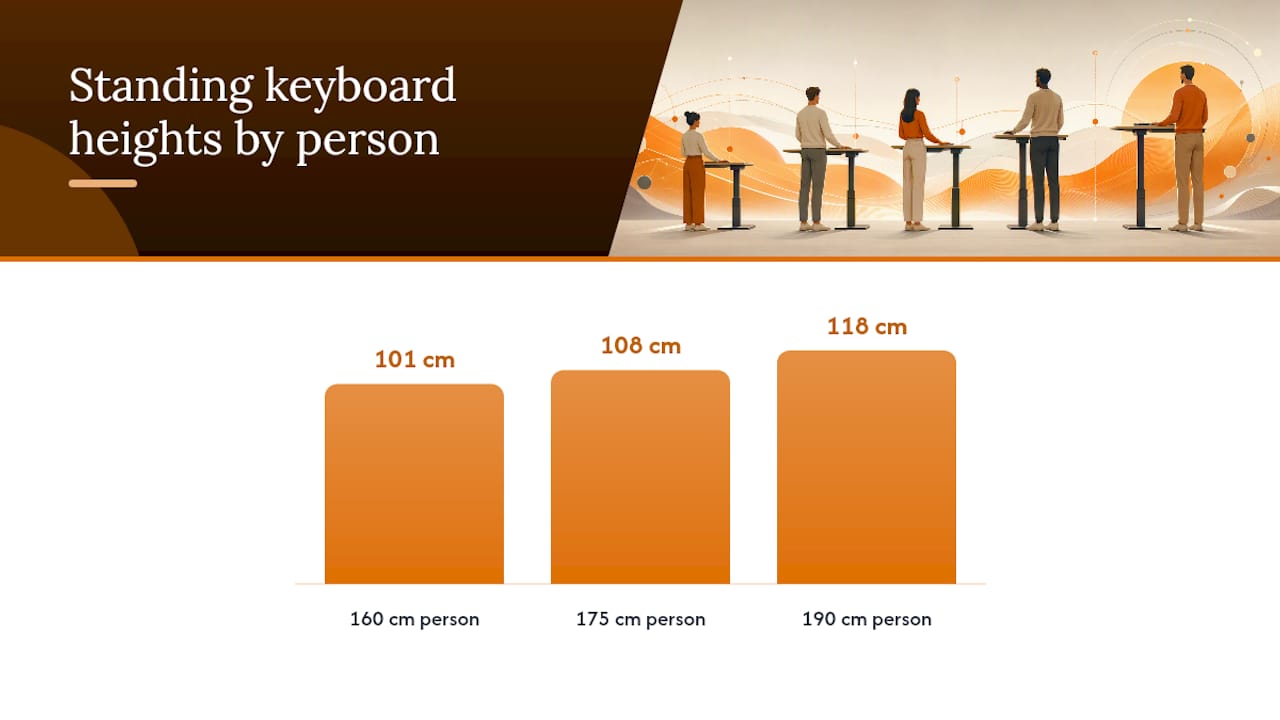
A person at 160 cm typically needs a seated height around 66 to 68 cm and a standing height around 99 to 102 cm, near the bottom of most vendor ranges. A person at 175 cm sits closer to 71 to 73 cm seated and 107 to 109 cm standing. A person at 190 cm needs 76 to 78 cm seated and roughly 116 to 119 cm standing, pushing right up against the maximum many standard frames offer. Monitor top height should land at the upper third of the screen for all three, adjusted with a monitor arm rather than by raising the whole desk, and viewing distance should sit roughly 52 to 70 cm from the eyes depending on screen size. If your team runs a mix of standing intervals through the day, our guide to standing desk time guidelines covers how long each preset should realistically be used.
EN 527 is the European dimensional standard for office desks and work tables, and it’s the reference point most UK office furniture specs quietly build from, even when the word “standard” never appears on a product page. It defines how desk height, legroom, and clearance should be measured, and sets numerical minima rather than vague guidance.
The standard classifies desks into four adjustability types, and knowing which one you’re buying changes what you can request in writing:
For sit-stand procurement, only Type A desks meet the brief, so it’s worth asking suppliers to confirm the type in writing rather than assuming “adjustable” means user-adjustable.
EN 527 sets the numerical minima for legroom depth, knee clearance, and foot clearance that a desk must meet at both its lowest and highest settings, not just at a single “default” height. A desk that passes at 72 cm but fails at 118 cm has not actually met the standard.
When reading a vendor spec sheet, check that clearance figures are stated at both extremes of the height range, not averaged or quoted once. Ask specifically for the measured legroom depth and knee clearance figures used in EN 527 testing, since these are the numbers that determine whether a taller employee can actually sit comfortably without their knees catching the underside of the desktop at full standing height. A spec sheet that only says “meets EN 527” without citing figures is not enough to act on.
Surface size decisions should follow the equipment sitting on the desk, not the other way round. Buying a fleet of identical desks regardless of role is the single most common sizing mistake procurement teams make, and it usually surfaces months later as a string of individual requests for monitor arms that don’t quite fit.
For single-monitor roles, a depth of 60 to 70 cm is usually sufficient, giving enough distance for comfortable viewing without wasting floor space. For dual-monitor roles, aim for 70 to 80 cm minimum, since two screens plus a keyboard tray need more clearance than one screen alone. For ultrawide or triple-monitor setups, 90 to 100 cm depth becomes necessary, particularly if a laptop dock sits alongside the main displays.
Width follows a similar logic but interacts more with layout style:
Pro Tip: Cable routing eats more desktop space than most buyers budget for. A desk with built-in cable ports, like the Air Height Adjustable Slimline Desk with Cable Ports, keeps trailing leads off the surface and away from the lift mechanism, which matters more on a sit-stand frame than a fixed desk since cables get pulled and flexed with every height change.
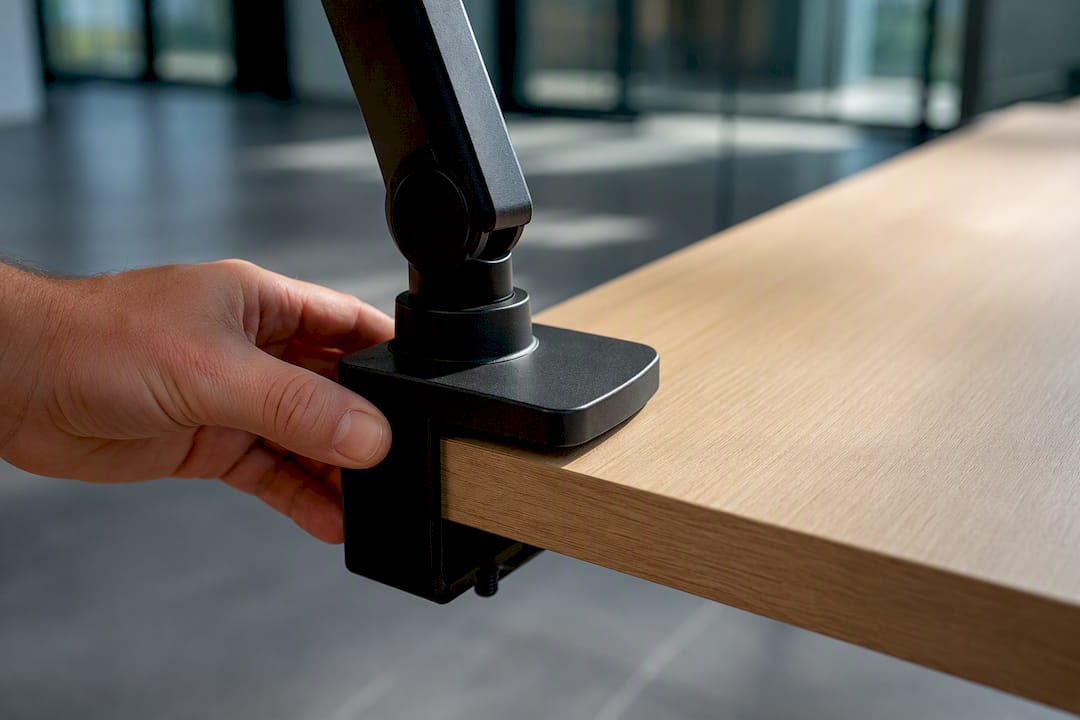
Deeper desktops also change viewing geometry. A shallow 60 cm desk pushed against a wall often forces a monitor too close to the eyes, especially once a monitor arm’s clamp base eats into usable depth. Measure the arm’s footprint before finalising desktop depth for any dual-screen order.
Most vendor-quoted ranges (roughly 58 to 72 cm seated, 118 to 125 cm standing at the front edge) comfortably cover adult staff between about 157 cm and 190 cm tall. That’s the bulk of most UK office populations, but it leaves two groups exposed if you don’t check for them specifically.
If even one employee falls outside the standard range, it’s cheaper to order a single tall-frame desk for that person than to force a compromise range across the whole office. Our height adjustable desk setup guide covers preset configuration once the right frame is on site, including how to lock presets so staff don’t accidentally overwrite them.
A tender or purchase order that only specifies “height-adjustable desk, 160 cm” leaves too much room for a supplier to substitute a cheaper frame with a narrower range. Copy the fields below directly into your spec sheet.
Dimensional fields to request in writing:
Acceptance checks to run on delivery, before signing off:
For bulk orders, negotiate a sample approval stage before the full run ships, agree staggered delivery if you’re fitting out floor by floor, and get warranty handling and spare-parts lead times confirmed in writing rather than assumed from a generic terms page.
| Checklist item | What to specify | Why it matters |
|---|---|---|
| Height range | Min/max front-edge height in mm | Confirms real coverage, not marketing rounding |
| Legroom | Depth in mm at both height extremes | EN 527 compliance depends on both ends |
| Weight capacity | kg, static or dynamic | Protects against sag under monitor arms |
| Warranty | Years, by component | Motor and frame often carry different terms |
| Lead time | Weeks, per batch size | Avoids fit-out delays on staggered orders |
Browse the office desks category to compare frame specs side by side before drafting the final tender, and keep a shortlist of ergonomic desk models on hand in case a sample needs swapping out during approval.
Having supplied desks into offices with everything from open-plan startups to fifty-person legal teams, the same mistake shows up again and again: someone specs desk height using average adult height, not the actual range of people sitting at those desks. Average height tells you almost nothing useful, because it hides the two or three staff who’ll be uncomfortable at either extreme of your chosen range.
The second mistake is treating desktop depth as an afterthought once width is decided. Depth is what actually determines whether a dual-monitor setup feels cramped six months in, long after the invoice is settled.
For hybrid teams, order a slightly wider height range than your current headcount seems to need. New hires rarely match the profile of the people who set the original spec, and a frame that can’t stretch to cover a new starter becomes next year’s ad hoc purchase order. On large deliveries, confirm lift access and floor protection before the van arrives; a hundred desks stuck in reception because a lift can’t take a pallet is a Monday nobody wants.
— Furniture
Guessing at desk dimensions from a supplier’s glossy brochure is how offices end up with a stack of returns after fit-out. Height-adjustable desks with clearly stated front-edge height ranges and desktop dimensions allow procurement teams to match specs to their actual staff profile rather than a rounded average.

The office desks range covers widths from compact single-monitor setups through to 180 cm dual-monitor layouts, with options like the Air Height Adjustable Desk without Cable Ports for teams that want a clean frame without built-in routing. For teams pairing desks with new seating, the office chairs range is worth reviewing alongside your desk order, since chair height and desk height need to be checked together, not separately. Bulk buyers can request sample approval and staggered delivery ahead of a full order. It is advisable to request a quote or a sample desk before committing to a full office run.

Phone: 0330 043 4114
VAT no. GB 991 8681 60
Company no. 07250570