For most UK commercial meeting rooms, in-desk modular power units with individually fused UK sockets, USB-C PD charging, and 6C keystone media slots are the right starting point. They comply with BS 6396 for furniture electrical distribution, keep cables tidy without sacrificing connectivity, and accept new modules as your AV setup evolves.
Immediate procurement step: before placing any order, ask your supplier to confirm BS 6396 compliance, individually fused outlets, and a GST or short-lead termination for the electrician. Book a site survey before finalising cut-out dimensions.
In-desk modular power with individually fused sockets, 65W USB-C PD, and 6C keystone slots is the most future-proof meeting room power solution for UK commercial fit-outs.
| Point | Details |
|---|---|
| Default specification | In-desk letterbox modules with BS 6396 compliance, fused sockets, and 65W USB-C PD cover most UK meeting rooms. |
| Ask before ordering | Confirm BS 6396 compliance, fused outlet rating, PD wattage under simultaneous load, GST lead type, and warranty terms. |
| Involve the electrician early | Book a site survey before finalising cut-out dimensions and confirm RCBO protection and circuit capacity at planning stage. |
| Spare capacity pays off | Specify at least one spare keystone slot and one spare module bay per unit to avoid costly upgrades later. |
| Furnitureforbusiness | Supplies meeting tables with pre-cut cable ports verified against popular in-desk module families, with free UK mainland delivery and bulk pricing. |
UK suppliers now offer six distinct solution categories for conference room power. Each suits a different room type, budget, and installation context.
In-desk letterbox / flush modules sit flush with the table surface behind a brush strip or flip lid. The VIDEK In Desk Horizontal Power range is a well-known example: letterbox-style units with 2 x UK mains sockets, USB ports, and 6C keystone cutouts for HDMI or RJ45, supplied with a GST18 short lead for fast electrician connection. Cables can remain plugged in when the lid is closed, which matters in boardrooms where the table needs to look presentable between meetings.
Flip-top / retracting-lid modules rise from a recess in the table surface and retract when not in use. The Crestron FT2-500 FlipTop supports up to eight module slots across two rows, accepts AC outlet modules and USB charging modules, and its lid design allows cables to extend while closed. These units carry a higher price and require more configuration, but the accessory ecosystem is extensive.
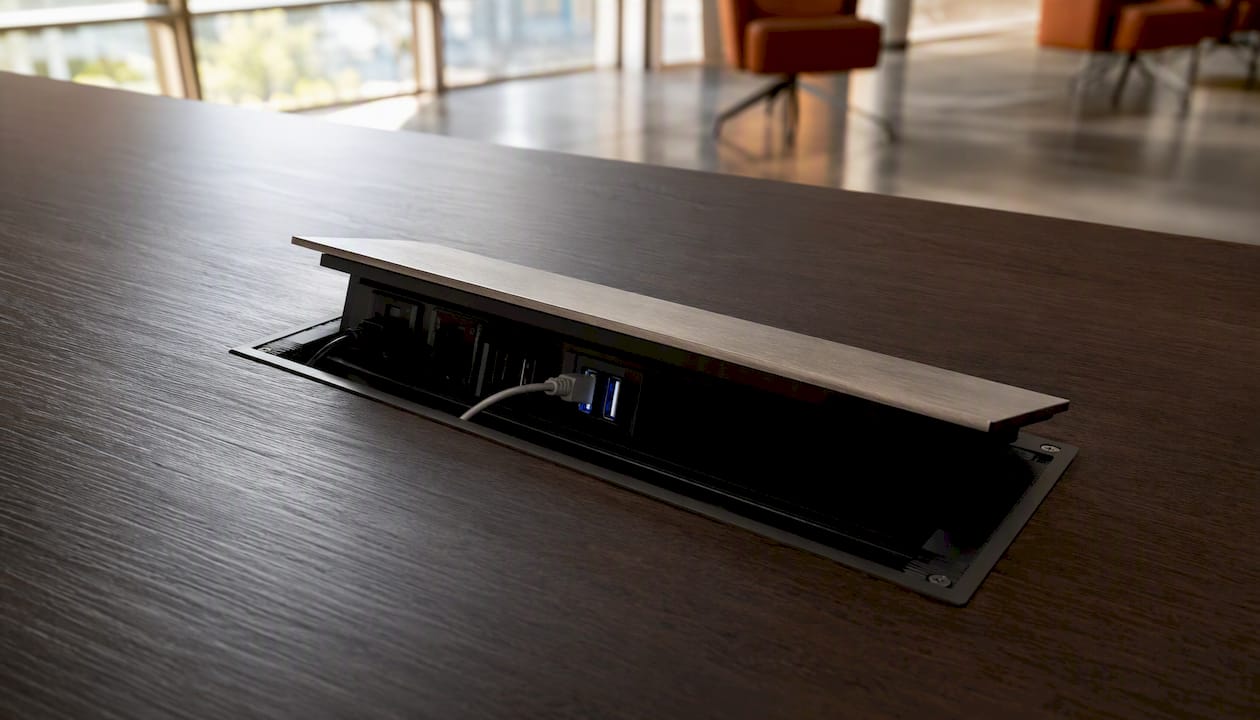
Pop-up towers and desktop boxes push up through a cut-out or sit on the surface. The Legrand Incara pop-up module combines a BS socket with a 30W USB-C PD charger in a brushed aluminium housing (IP20, IK07, 16A supply current). Good for huddle rooms and retrofit scenarios where cutting a full letterbox slot is impractical.
Floorboxes and underfloor distribution route power and data through the floor slab or raised floor void, with flush or low-profile access covers at table positions. Legrand’s commercial range includes low-profile raceways and poke-through devices for open-plan and flexible layouts. These suit large boardrooms and open spaces where underfloor infrastructure already exists.
Wireless charging pads are embedded in or placed on the table surface and charge Qi-compatible devices without cables. Useful as a supplement, not a replacement: they cannot power laptops and add cost per seat.
Portable power banks and power towers require no installation. They work for temporary rooms or overflow spaces but introduce cable clutter and need regular recharging.
| Solution type | Best for | Power types | Installation | Retrofit ease |
|---|---|---|---|---|
| In-desk letterbox module | Mid-size and boardroom tables | AC, USB-A, USB-C PD, keystone AV | Cut-in, electrician required | Moderate (needs slot cut) |
| Flip-top / retracting lid | Boardrooms, AV-heavy rooms | AC, USB-A, USB-C PD, backlit modules | Cut-in, electrician required | Moderate to complex |
| Pop-up tower | Huddle rooms, retrofit | AC, USB-C PD | Cut-in or surface | Easy to moderate |
| Floorbox / underfloor | Large boardrooms, open plan | AC, USB-A, data | Underfloor, specialist install | Difficult without raised floor |
| Wireless charging pad | Supplement to above | Qi wireless only | Surface mount | Very easy |
| Portable power bank | Temporary / overflow | AC, USB | None | Immediate |
Getting the spec right on paper saves a costly return visit from your electrician. These are the minimum requirements to write into every purchase order.
BS 6396 compliance and fused sockets. UK furniture power modules must comply with BS 6396, the standard governing electrical systems built into furniture. ABL’s Flip-S range supplies individually fused G-type sockets at 3.15A or 5A per outlet, which is the correct approach: a single unfused multi-socket strip is not compliant and creates a fault-propagation risk across the whole table.
USB-C PD wattage under simultaneous load. A 30W USB-C PD port charges a phone comfortably but will not sustain a laptop under load. Specify 45W as the minimum for mixed device environments; 65W if your users regularly run MacBook Pros or Windows ultrabooks. Critically, ask whether the stated wattage is per-port or shared across all USB ports simultaneously. Manufacturer datasheets will confirm whether USB ports are power-only or data-capable and what the simultaneous load limit is.
6C keystone / media cutouts. Require at least two 6C keystone slots per module position for HDMI and RJ45 (CAT6 or CAT6A). This keeps AV and data connections in the same housing as power, reducing cable runs across the table.
GST connector and lead length. Installer-friendly connectors such as the GST18 shorten electrician time on site and reduce the risk of incorrect field terminations. The VIDEK In Desk range ships with a short GST18 lead as standard. Specify the connector type and lead length in your order so the electrician knows what to expect before arriving on site.
IP and IK ratings. For any module in a position where liquids or impact are plausible (a catering suite, a training room with heavy daily use), require at minimum IP20 and IK07. The Legrand Incara, for example, is rated IP20 and IK07 with a 16A supply current.
Specification minimum: BS 6396 compliance, individually fused outlets (3.15A or 5A), USB-C PD at 45W or above per port under simultaneous load, 6C keystone slots, GST18 or equivalent short lead, UKCA or CE declared conformity, and IP/IK ratings stated on the datasheet.
Work through these criteria in order before contacting a supplier.
Questions to ask every supplier before ordering:
Red flags to walk away from: non-fused multi-socket strips presented as furniture power solutions; PD wattage stated without clarifying simultaneous load behaviour; no installer-friendly connector on the lead; missing UKCA/CE conformity documentation; no spare module availability after purchase.
Hand your electrician a complete specification pack before they arrive on site. A missing detail at this stage typically costs a return visit.
What to include in the pack:
Compliance items to confirm on delivery:
BS 6396 covers electrical systems incorporated into furniture and is the governing standard for all in-desk and flip-top modules in UK commercial interiors. UKCA marking (or CE declared conformity for products placed on the market before the transition deadline) must appear on the unit or its packaging. BSI Kitemark references, where a manufacturer holds them, provide additional assurance.
Electrician’s checklist: confirm the circuit is protected by an RCBO (not just an MCB) for earth fault protection, test each outlet after installation using a socket tester, label the circuit at the consumer unit, and provide a test report to the facilities manager for the building’s electrical records.
Practical installation sequence:
A practical configuration for three common room sizes, based on in-desk letterbox modules with individually fused UK sockets, USB-C PD, and 6C keystone slots:
Small huddle room (2–4 people, table up to 1.4m): one module position, 2 x fused UK sockets, 1 x USB-C PD 45W port, 2 x 6C keystone slots (1 x HDMI, 1 x RJ45 CAT6). A single pop-up unit such as the Legrand Incara covers this configuration with minimal cut-out work.
Mid-size meeting room (6–8 people, table 1.8–2.4m): two module positions, 2 x fused UK sockets per position, 2 x USB-C PD 65W ports per position, 2–4 x 6C keystone slots per position. The VIDEK In Desk Horizontal Power letterbox unit suits this layout well, with its brush strip allowing cables to remain connected between meetings.
Boardroom (10–14 people, table 3m+): three or more module positions, 4 x fused UK sockets per position, 2 x USB-C PD 65W ports per position, 4 x 6C keystone slots per position (HDMI, RJ45 CAT6A, spare x2). The Crestron FT2-500 FlipTop with its eight-slot capacity suits high-AV boardrooms where backlit module icons and a premium finish are priorities.
Furnitureforbusiness meeting room tables are supplied with pre-cut cable ports sized to accept popular in-desk module families, which removes the carpenter stage from the installation sequence and reduces the risk of a mismatched cut-out on site.
The difference between a meeting room that looks professional and one that looks like a building site often comes down to three small decisions: lid type, cable separation, and labelling.
Brush strips and flip-down lids are the two dominant finishing options for in-desk modules. Brush strips allow cables to pass through the aperture while the module is in its resting position, keeping the surface tidy without requiring users to disconnect before closing. Flip-down lids that retract fully (as on the Crestron FlipTop) give a cleaner closed appearance but require cables to exit from the side of the unit rather than the top. Neither is universally better; the right choice depends on how often the room is reconfigured between meetings.
Separate power and data runs. Routing high-voltage power cables alongside low-voltage data and AV cables in the same trunking creates electromagnetic interference that degrades video and audio quality. Good cable management practice recommends keeping them in separate conduits or at minimum 150mm apart in open tray runs, and leaving 30–40% spare capacity in trays for future additions.
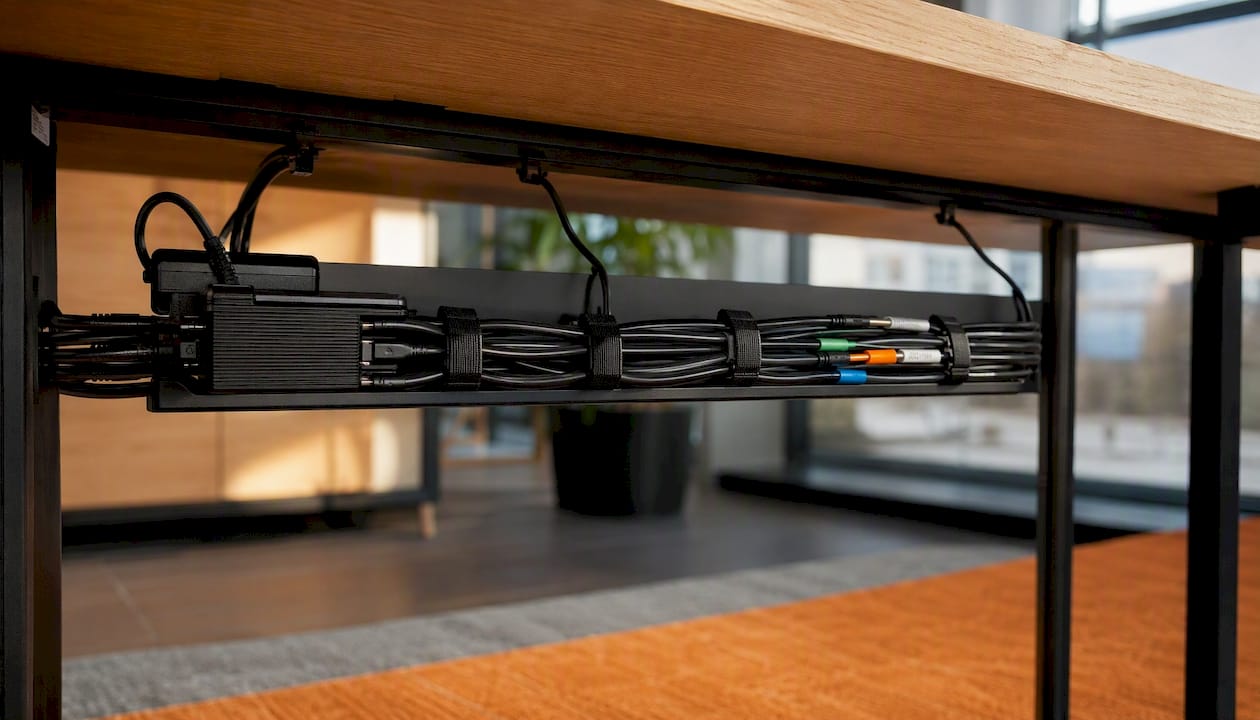
Under-table cable trays house power bricks and excess cable length, keeping them off the floor and away from the heat pockets that form when transformers are bundled together in an enclosed space.
Pro Tip: Use velcro ties rather than cable ties for all under-table dressing. Velcro allows the AV team to re-route cables without cutting, which matters every time a new piece of equipment is added to the room.
Labelling at both ends of every cable run is the single most time-saving maintenance practice in a multi-room office. A label printer and a consistent naming convention (room reference + circuit number + port) means any electrician or AV engineer can trace a fault in minutes rather than hours.
Backlit module icons are worth specifying for any room used in low-light conditions, such as presentation suites or rooms with blackout blinds. The marginal cost is small; the usability improvement for delegates fumbling for a socket in a darkened room is immediate.
Budget ranges vary significantly by solution type and room size. These are indicative figures based on typical UK market pricing; always obtain three quotes before committing.
Lead time is driven by four factors: custom cut-out dimensions, non-standard fascia colours, module availability from the manufacturer, and electrician diary availability. Premium flip-top systems such as the Crestron FT2-500 often carry longer lead times because modules are configured to order.
A simple procurement sequence that avoids the most common delays: site survey first, then order furniture and power modules in the same transaction where possible, then book the electrician once a confirmed delivery date is in hand. Ordering furniture and modules separately is the fastest way to arrive on site with a cut-out that does not match the module.
Pro Tip: Combine your furniture and power module order wherever possible. Pre-cut tables from a supplier who has verified the cut-out dimensions against the module family you have specified eliminates the most common installation delay.
The most common oversight is specifying USB-C PD wattage that looks adequate on paper but falls short under real meeting conditions. A 30W port charges a phone quickly but throttles a laptop to a crawl when the CPU is under load. Specify 65W as the default for any room where laptops will be in regular use, and confirm the wattage holds under simultaneous load across all USB ports on the unit.
The second most common mistake is ordering modules without GST leads, then discovering on installation day that the electrician needs to field-terminate a connection that should have been factory-made. GST18 connectors are not exotic; every reputable UK supplier of in-desk modules offers them. If a supplier cannot confirm the connector type, that is a red flag worth acting on before the order is placed.
The third is specifying the bare minimum number of module slots. A six-slot unit costs marginally more than a four-slot unit. The two spare slots cost almost nothing at the point of order and a great deal when you need to add a USB-C data hub or a wireless presentation receiver eighteen months later. Specify spare capacity as a line item, not an afterthought.
Involve your electrician before the furniture order is placed, not after. A ten-minute conversation about circuit capacity, RCBO protection, and cable route options at the planning stage prevents the kind of surprises that push installation costs well above the original budget.
Furnitureforbusiness supplies meeting room tables with pre-cut cable ports sized to accept popular in-desk module families, which means your electrician arrives to a table that is already prepared rather than a surface that needs routing on site.
Every order comes with free delivery to the UK mainland, and bulk pricing is available for multi-room fit-outs. The furniture-first approach means cut-out dimensions are verified against the module family before despatch, removing the most common source of installation delay. For facilities teams managing a phased refurbishment, that single point of coordination between furniture and power specification saves time and reduces the risk of a mismatch on installation day.
Browse the meeting room range or the office desks category to find tables and desks with integrated cable ports. To request a quote or discuss a site survey, contact the Furnitureforbusiness team directly through the website.
The sources below are the primary references used for technical claims in this article. They are worth bookmarking for your electrician and supplier conversations.
Standards reference: BS 6396 (Electrical systems in office furniture and office screens) is the governing UK standard for all in-desk and furniture-integrated power modules. Require a copy of the manufacturer’s declared conformity document before placing any order.

Phone: 0330 043 4114
VAT no. GB 991 8681 60
Company no. 07250570