TL;DR:
- An office relocation checklist workflow is a phased, governed plan that ensures a low-disruption move by coordinating teams, IT, logistics, and compliance. Effective planning, clear accountability, early IT engagement, and stage-gate sign-offs are crucial to prevent delays, budget overruns, and operational impacts. Post-move audits and proper furniture setup transform the relocation into an opportunity to optimize workspace support for modern work practices.
An office relocation checklist workflow is a structured, phase-by-phase plan that synchronises teams, IT systems, logistics, and compliance to deliver a low-disruption move from start to finish. Without it, corporate relocations routinely overrun budgets, stall IT infrastructure, and leave employees without functional workspaces for days. UK office moves typically plan between 3 and 6 months, extending to 6 to 12 months for larger or more complex relocations. The difference between a move that costs the business and one that strengthens it comes down to governance, sequencing, and accountability at every phase.
A structured relocation process steps through six distinct phases, each with defined outputs and sign-off criteria before the next begins.
Phase 1: Strategic planning (6 to 12 months out)
Define your relocation objectives before a single box is packed. This means reviewing your current lease break clauses, setting a realistic budget, and mapping headcount projections for the next three to five years. Appoint a dedicated move lead at this stage. Without a single accountable owner, decisions get deferred and costs escalate.
Phase 2: Team assembly and governance (4 to 6 months out)
A successful office move requires a cross-functional team led by one project lead coordinating facilities, IT, HR, finance, and external vendors. Assign clear decision rights to each function. Establish a weekly governance cadence with a shared risk log from day one.
Phase 3: Logistics and vendor coordination (3 to 4 months out)

Commission scaled floor plans for the new site and begin soliciting quotes from commercial movers. Map dock access, lift dimensions, and floor protection requirements at both sites. Aligning inventory to building constraints at this stage prevents inaccurate vendor estimates and costly last-minute adjustments.
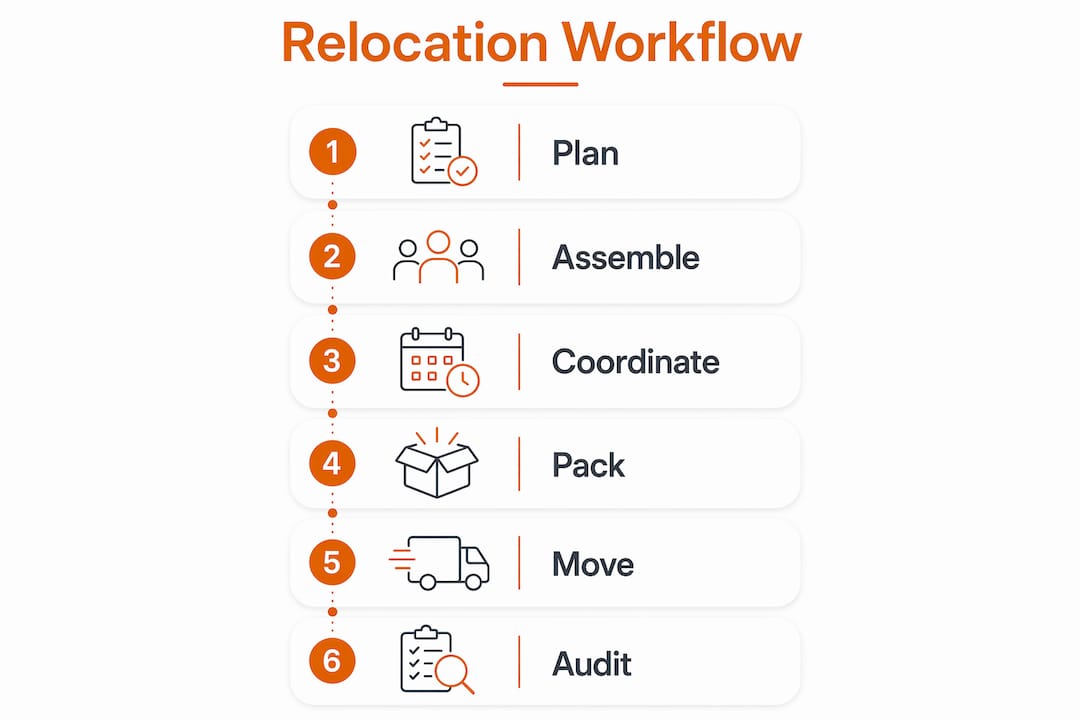
Phase 4: Packing and final preparation (4 weeks to move day)
Issue a moving office supplies checklist to every department. Label all assets with colour-coded zone identifiers and workstation destination codes. Communicate the move timeline to all staff, including out-of-hours access arrangements and IT blackout windows.
Phase 5: Move day execution
A critical move-day sequence includes securing building access, coordinating IT cutover and testing, and scheduling the physical move in a low-impact window such as a weekend. Assign zone captains to confirm correct placement at the destination. Conduct an IT systems validation before declaring the new site operational.
Phase 6: Post-move audit
Post-move validation and snag list creation are vital to track damages, IT issues, and space optimisation opportunities. Complete the snag list within 48 hours of move day. This turns a move plan into an operational reality rather than an abandoned document.
Pro Tip: Treat each phase boundary as a stage-gate. Require a formal sign-off before proceeding. This single discipline prevents the most common cause of relocation failure: moving forward before dependencies are confirmed.
Clear accountability is the single biggest predictor of a move that stays on schedule and within budget. Without it, every department assumes someone else is handling the critical details.
The relocation lead functions as the single point of accountability across all workstreams. This person owns the master timeline, chairs the governance meetings, and makes the final call when competing priorities arise. In larger organisations, this role is often filled by a senior facilities manager or an external project manager with commercial move experience.
The cross-functional committee should include representatives from the following areas:
“Disciplined governance with clearly defined decision rights and an internal relocation lead is the most reliable way to prevent budget and schedule drift.” Source
Checklists fail without timed stage-gates with sign-offs to prove readiness at dependency boundaries such as access booked and IT freezes confirmed. A simple shared project board in tools like Microsoft Planner or Asana gives every function visibility of progress and blockers without requiring daily meetings.
Pro Tip: Schedule a 15-minute stand-up every Monday morning in the final eight weeks before move day. Short, frequent check-ins surface blockers faster than monthly steering group meetings.
For a deeper look at coordinating teams across a fit-out or relocation, the office fit-out workflow guide from Furnitureforbusiness covers the coordination model in detail.
IT migration is the highest-risk element of any office relocation. Treating it as a last-minute task is the most common and most expensive mistake a corporate team can make.
IT planning should start early, with key milestones beginning around 12 weeks before move day. The recommended sequence is as follows:
| IT milestone | Timing | Owner |
|---|---|---|
| Full infrastructure audit | 12 weeks out | IT lead |
| Connectivity and ISP confirmed | 8 weeks out | IT lead + facilities |
| Technology change freeze begins | 6 weeks out | IT lead |
| Full data backup completed | 2 weeks out | IT lead |
| Systems validation at new site | Move day | IT lead + move manager |
Pro Tip: Never rely on a single backup. Use both on-site and cloud-based backups completed within 48 hours of move day. If a server is damaged in transit, you need a recovery path that does not depend on the physical hardware.
The difference between a chaotic move day and a controlled one is almost entirely determined by the quality of your labelling and inventory system, set up weeks in advance.
Labelling systems with colour-coded zones and workstation IDs prevent misplacement and speed unpacking significantly. Build a digital inventory that maps every asset to its destination room and workstation code on the new floor plan. This gives movers a precise delivery instruction for every item, removing guesswork entirely.
| Approach | Without system | With colour-coded system |
|---|---|---|
| Box misplacement rate | High | Significantly reduced |
| Unpacking time | Unstructured, slow | Sequenced, fast |
| IT equipment tracking | Manual, error-prone | Mapped to floor plan |
| Staff disruption | Extended | Minimised |
Practical steps to implement before move day:
Mapping items to physical building constraints such as dock access, lift capacity, and corridor pinch points also prevents the scenario where large furniture arrives before the lift is available or a server rack cannot fit through a doorway.
A corporate office move carries genuine legal and financial exposure. Treating risk management as a box-ticking exercise rather than a control system is how businesses end up with damaged equipment, injured staff, and voided insurance claims.
UK health and safety risk assessments for office moves must identify foreseeable hazards with proportionate controls and be treated as living documents updated as conditions change. The key risk areas to address are:
“Risk assessment works best as a control system with practical controls like specialist equipment handling and phased disconnection and reconnection schedules, requiring continuous review and updates with shifting move conditions.”
Maintain a single living risk document owned by the relocation lead. Update it after every governance meeting. When conditions change, such as a delayed fit-out or a change in mover, the risk document must be reviewed and reissued before work continues.
A structured office relocation checklist workflow, built around phased stage-gates, cross-functional governance, and early IT planning, is the only reliable way to move a corporate office without disrupting business continuity.
| Point | Details |
|---|---|
| Phase your timeline | Plan 6 to 12 months out for complex moves, with defined outputs at each phase boundary. |
| Appoint one accountable lead | A single relocation project manager prevents decision drift and keeps budget and schedule on track. |
| Start IT planning at 12 weeks | Early IT audits, change freezes, and staged cutovers protect data and minimise downtime. |
| Use colour-coded labelling | Zone-based labels with workstation destination codes cut unpacking time and reduce misplacement. |
| Treat risk as a living document | Update your risk assessment after every governance meeting and whenever move conditions change. |
After working with hundreds of UK businesses on their office setups, the pattern is consistent. The moves that go wrong are not the ones with the tightest budgets or the most complex floor plans. They are the ones where no single person owned the outcome.
The most underrated discipline in any workplace transition checklist is the stage-gate sign-off. Most teams treat a checklist as a list of tasks to tick. The ones that execute well treat it as a proof-of-readiness tool. Before phase three begins, phase two must be signed off. Before move day is confirmed, IT, facilities, and building management must all have confirmed their dependencies in writing. That single habit eliminates the majority of move-day surprises.
IT involvement is the other area where I see consistent underinvestment. Teams that bring IT into the conversation at week two rather than week twelve almost always face a connectivity delay at the new site. ISP lead times alone can run to six weeks. Factor that in from the start, or accept the risk of operating on mobile data for your first week in a new building.
Post-move audits are treated as optional by most teams and as mandatory by the best ones. A 48-hour snag list, reviewed with the mover and the facilities team, closes out the move properly. It also gives you the data to run a better move next time. The new office setup workflow guide from Furnitureforbusiness covers the post-move setup phase in practical detail for UK office managers.
The businesses that get this right do not just move offices. They use the relocation as a forcing function to redesign how their workspace supports the way their teams actually work in 2026.
— Furniture

Once your relocation workflow delivers you to the new site, the quality of your workspace depends on the furniture you put in it. Furnitureforbusiness supplies commercial-grade ergonomic office chairs and height-adjustable desks to UK businesses of all sizes, with free delivery to the UK mainland. Whether you are furnishing a 10-person team or a 300-seat corporate floor, the range covers ergonomic seating, executive chairs, meeting room furniture, and office storage solutions built for the demands of a modern hybrid workplace. Bulk order pricing and easy returns make procurement straightforward at exactly the moment when you have enough to manage.
An office relocation checklist workflow is a structured, phase-by-phase plan that coordinates teams, IT, logistics, and compliance across the full lifecycle of a corporate office move. It converts a task list into a governed process with stage-gate sign-offs at each phase boundary.
UK office moves typically require 3 to 6 months of planning, with larger or more complex relocations needing 6 to 12 months. IT infrastructure planning should begin at least 12 weeks before move day regardless of overall timeline.
A single accountable project lead should own the entire relocation, supported by a cross-functional committee covering IT, facilities, HR, finance, and vendor management. Without one owner, decision-making stalls and costs escalate.
A staged IT cutover plan starting 12 weeks out, including a technology change freeze, full data backups, and on-site IT support during the first week, is the most reliable way to protect systems and reduce downtime.
A post-move audit should capture a snag list of damages, unresolved IT issues, and space optimisation opportunities, completed within 48 hours of move day. Post-move validation turns the move plan into an operational baseline for the new site.

Phone: 0330 043 4114
VAT no. GB 991 8681 60
Company no. 07250570