Cable ports, also known as desk grommets, are protective rings fitted into pre-cut holes in a desk or worktop surface. Their job is straightforward: guide cables through the desktop cleanly, protect them from abrasion against raw edges, and keep the workspace tidy. The terms are interchangeable in UK office furniture; whether you see “cable port,” “desk grommet,” or “worktop cable tidy” on a product listing, you are looking at the same fitting.
Here is what a cable port does in practice:
Cable ports are a standard feature in UK commercial office furniture, specified during desk design or retrofitted into existing worktops. They are the starting point for any serious cable management solution in a professional workspace.
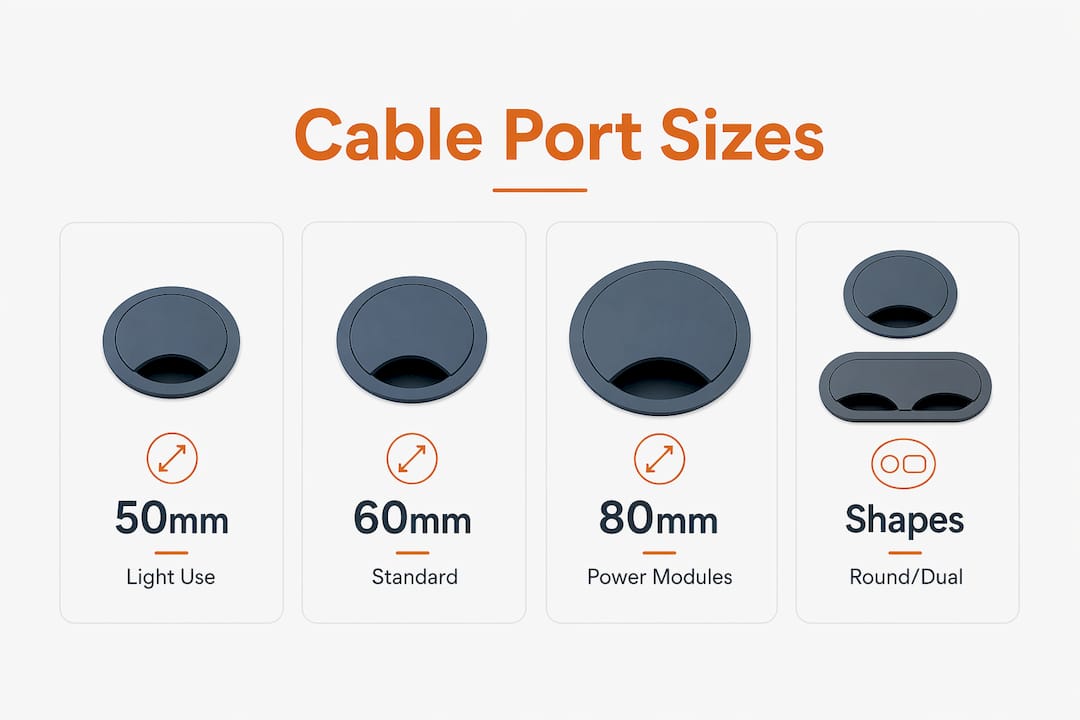
Round cable ports dominate the UK market, and three diameters cover the vast majority of office desk applications. Standard round grommet diameters are 50mm, 60mm, and 80mm. The 80mm size has become the preferred choice wherever integrated power modules are specified, because it accommodates AC sockets, USB ports, and data connections within a single fitting.
| Diameter | Typical shape | Best suited for |
|---|---|---|
| 50mm | Round | Light cable runs, single monitor setups |
| 60mm | Round | Standard workstations with moderate cabling |
| 80mm | Round | Integrated power and USB modules |
| Varies | Square or rectangular | Bench desks, bespoke worktops |
Square and rectangular ports appear on bench desking systems and bespoke worktops where the desk manufacturer has specified a non-circular cutout. They suit situations where multiple cables need to pass side by side, or where a rectangular power module is being integrated.
Key size considerations for office managers:
Pro Tip: If you are specifying cable ports for a batch of desks, request the exact cutout dimensions from the desk manufacturer rather than relying on catalogue descriptions. Tolerances vary between suppliers, and a grommet that is even a few millimetres too wide will not seat flush.
The three standard materials for desk grommets are plastic, metal, and rubber, each with a different balance of durability, finish, and cost.
Beyond simple pass-through grommets, there are two more sophisticated types worth knowing.
Integrated power modules sit inside an 80mm cutout and bring mains sockets, USB-A, USB-C, or data ports up to the desktop surface. They are specified for individual workstations where users need desktop power access without trailing extension leads.
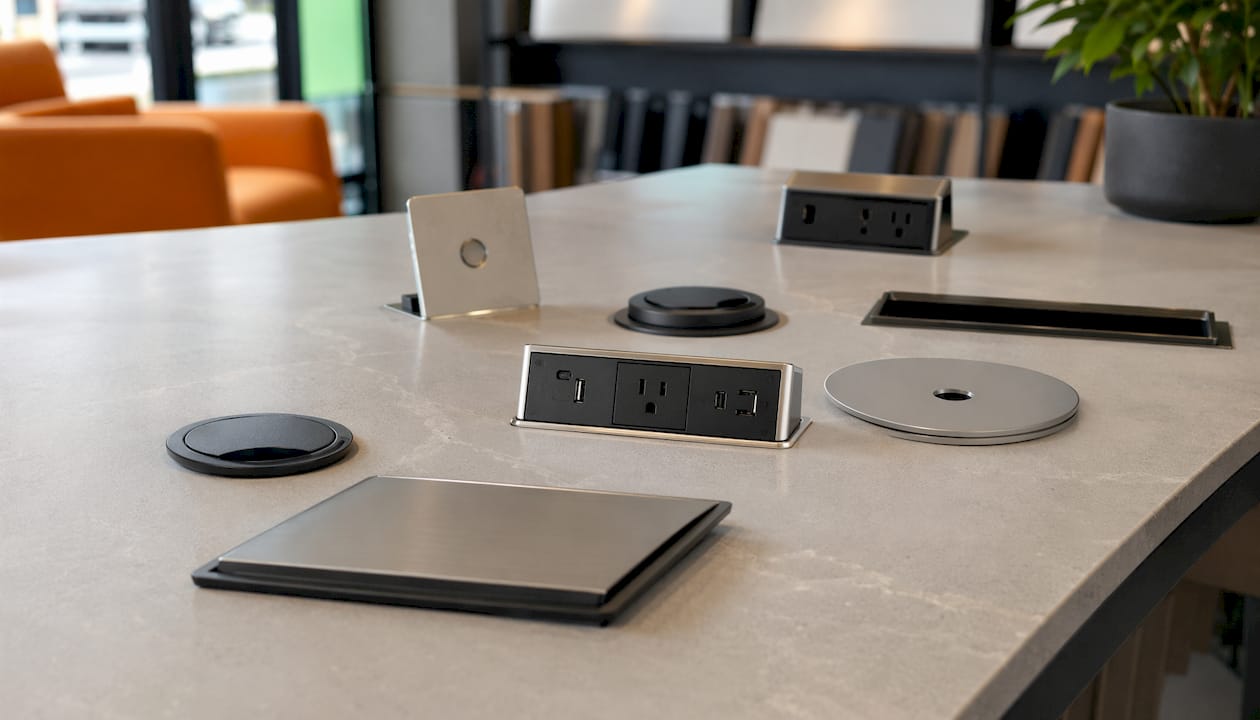
Desk access flaps, sometimes called cable power flaps, are a different product category. Flaps commonly include AC sockets, network ports, and USB chargers and are designed primarily for conference tables. They feature a hinged or sliding lid that conceals the connectivity when not in use, protecting against spills and maintaining a clean table surface during presentations.
Pro Tip: Match the grommet material to the desk finish, not just the function. A brushed-steel grommet on a white laminate desk looks out of place and dates quickly. Specify the colour and finish at the same time as the desk order to avoid mismatches.
Cable ports do more than tidy a desk. They are a practical safety measure and a direct contributor to equipment longevity.
Cable clutter poses trip hazards, fire risks, and equipment damage; professional cable management balances accessibility with protection to mitigate those risks. The role of cable access in desks is therefore not cosmetic. It sits at the intersection of workplace safety, equipment reliability, and the day-to-day experience of the people using the space.
A useful planning principle: most cables are permanently routed and inaccessible (typically around 70%), while a smaller portion—about 30%—are user-facing at the desk surface via grommets or power hubs with strain relief. Specifying cable ports correctly is what makes that user-facing portion work safely.
Getting the specification right before you order saves time, money, and the frustration of a retrofit. Work through these points in order.
The distinction matters most when specifying for meeting rooms versus individual workstations.
A simple cable port is an open passthrough. It lines the cutout, protects the cable, and does nothing else. The cable goes in the top and comes out underneath. There is no lid, no socket, and no connectivity built in. This suits dedicated desks where the cable configuration is fixed and users do not need to plug in and unplug regularly.
An integrated desk power flap is a different product. Desk access flaps feature hinged lids with AC sockets, network ports, and USB chargers and are designed for conference tables where multiple users connect different devices throughout the day. The lid closes when not in use, concealing the connectivity and protecting against accidental spills during meetings.
Key differences at a glance:
Workplace planners recommend matching the opening mechanism to the space usage: hinged flaps for meeting rooms, open grommets for dedicated desks. That principle holds across virtually every UK office configuration.
Specification decisions made early in a fit-out are far cheaper than corrections made after desks are installed.

Confirm the cutout dimensions and tolerances with the desk manufacturer before placing a grommet order. This sounds obvious, but procurement teams regularly order grommets based on a desk model name rather than the actual cutout measurement, and the two do not always match.
Account for underside clearance when specifying integrated power modules. Deeper socket units can conflict with desk frames, cable trays, or the motor housing in height-adjustable desks. The clearance requirement varies by module, so check the product datasheet against the desk specification.
For sit-stand desks, plan the cable routing to accommodate the full height range. Cables need enough slack to travel from sitting height to standing height without pulling tight. Vertical “spine” cable managers allow controlled cable movement that matches desk height changes, reducing cable fatigue at connectors over time.
Use labelling on permanent cables at both ends. In multi-user bench environments, this reduces troubleshooting time considerably when a connection needs to be traced or replaced.
Pro Tip: Specify integrated socket modules during the desk design phase, not as an afterthought. Retrofitting a power module into an existing desk often requires a new cutout, which can compromise the worktop warranty and the furniture’s finished appearance.
Most cable ports require a pre-cut hole in the desk surface, either supplied by the manufacturer or cut on site. The installation process is straightforward for plain grommets; integrated power modules require additional steps.
For standard grommets:
For integrated power modules:
Integrated modules with mains sockets must be installed by a qualified electrician in the UK, in line with BS 7671 wiring regulations. Plain pass-through grommets carry no such requirement and can be fitted by facilities staff.
Cable ports collect dust, debris, and occasionally spilled liquids, particularly in open-plan offices. A brief maintenance routine keeps them functional and presentable.
Rubber grommets benefit from an occasional wipe with a silicone-based product to prevent the rubber from drying and cracking, especially in offices with low humidity.
Cable management is a workplace safety matter, not just an aesthetic one. The Health and Safety at Work etc. Act 1974 and the Workplace (Health, Safety and Welfare) Regulations 1992 both place a duty on employers to maintain a safe working environment, which includes managing trip hazards from trailing cables.
Cable ports directly support compliance by routing cables below the desk surface rather than across the floor. Key safety points for office managers:
Facility managers who treat cable management as a safety discipline rather than a tidiness preference tend to catch problems earlier and avoid the disruption of reactive repairs.
Cable ports and desk grommets are the same fitting: protective rings that line desk cutouts to route cables safely, and choosing the right size, material, and type for your desk configuration is what separates a tidy, compliant workspace from a hazardous one.
| Point | Details |
|---|---|
| Standard sizes | Round cable ports come in 50mm, 60mm, and 80mm diameters; 80mm suits integrated power modules. |
| Material choice | Plastic suits most offices; metal fits boardrooms; rubber lining offers the best cable abrasion protection. |
| Grommets vs flaps | Simple grommets suit fixed workstations; power flaps with hinged lids suit meeting tables and shared spaces. |
| Measure before ordering | Always confirm the desk cutout dimensions and panel thickness before purchasing; never assume a standard size fits. |
| Safety and compliance | Cable ports reduce trip hazards and support compliance with the Workplace (Health, Safety and Welfare) Regulations 1992. |
If you are specifying desks for a UK office fit-out and want cable management built in from day one, Furnitureforbusiness supplies a range of office desks with integrated cable ports across fixed-height and height-adjustable models. The Air Height Adjustable Desk with Cable Ports is a practical choice for teams moving to sit-stand working, with the cable port already specified to accommodate the cable slack that height adjustment requires.

Free delivery to the UK mainland is included on all orders, and bulk pricing is available for larger fit-outs. Browse the full desk range or contact the team for specification support on your next project.

Phone: 0330 043 4114
VAT no. GB 991 8681 60
Company no. 07250570